AGENTS.md vs CLAUDE.md: How AI Coding Agents Read Project Instructions
Coding agents read a Markdown file from your repository before they start work. Which file depends on the tool. Here is who reads what, where the files go, how to share one file between tools, what to write in it, and what two 2026 studies found about whether it helps.
Quick answer
- AGENTS.md is an open, plain-Markdown format for coding-agent instructions. OpenAI Codex, Cursor and GitHub Copilot read it. Gemini CLI reads it once you add it to a setting.
- CLAUDE.md is the instruction file of Claude Code. Claude Code reads AGENTS.md instead only when your project has no CLAUDE.md. GitHub Copilot also accepts one CLAUDE.md in the repository root.
- One file for all: write AGENTS.md. If you need Claude-only rules, add a CLAUDE.md whose first line is
@AGENTS.md. - Does it help? Research is mixed. One study saw faster runs and fewer output tokens. Another saw no general gain in task success and over 20% higher cost. Keep the file short and write down what the agent cannot guess.
What AGENTS.md is
AGENTS.md is a Markdown file for coding agents. The agents.md site places it next to your README. The README is for humans. AGENTS.md holds the extra context an agent needs: build steps, tests and conventions that would clutter a README.
There are no required fields. You write normal Markdown with any headings you like. The site suggests a project overview, build and test commands, code style, testing instructions and security notes. It adds: anything you would tell a new teammate belongs there too.
The format came out of work by OpenAI Codex, Amp, Jules from Google, Cursor and Factory. It is now stewarded by the Agentic AI Foundation under the Linux Foundation. The site lists many tools that work with it, including Codex, Cursor, Gemini CLI, VS Code, GitHub Copilot's coding agent, Devin, Aider, Zed, Warp, Junie and Windsurf.
Three rules from the agents.md FAQ are worth knowing:
- Nearest file wins. In a monorepo you can put an AGENTS.md in each package. The one closest to the edited file takes precedence. At the time of writing, the main OpenAI repo had 88 of them.
- Chat beats the file. Explicit prompts in chat override everything in AGENTS.md.
- Listed tests get run. If you list test commands, the agent will try to run relevant checks and fix failures before it finishes.
For Codex, this is the main file. OpenAI's Codex docs say Codex reads AGENTS.md files before doing any work.
What CLAUDE.md is
CLAUDE.md is Claude Code's instruction file. Each session starts with an empty context window, and Claude reads your CLAUDE.md files at the start of every session. The Claude Code memory docs describe four places for it:
- Managed policy (for example
/etc/claude-code/CLAUDE.mdon Linux): set by IT for every user on the machine. It cannot be excluded. - User:
~/.claude/CLAUDE.md, your preferences for all projects. - Project:
./CLAUDE.mdor./.claude/CLAUDE.md, shared with your team through version control. - Local:
./CLAUDE.local.md, personal notes for this project. Add it to.gitignore.
When to add a line. The docs give clear triggers: Claude makes the same mistake twice, a code review catches something Claude should have known, you retype the same correction as last session, or a new teammate would need the same context.
Imports. A CLAUDE.md can pull in other files with @path/to/file. Relative paths resolve from the file that holds the import. Imports can nest up to four hops. They help you organize, but they do not save context: imported files load at launch too.
Size. Anthropic suggests under 200 lines per file. Longer files use more context and reduce adherence. Claude Code loads a CLAUDE.md of up to 4 MiB in full and skips a larger one. Block-level HTML comments are stripped before loading, so you can leave notes for humans for free.
Rules for parts of the code. Instructions that only matter for some files can go in .claude/rules/. A rule with a paths field in its frontmatter loads only when Claude works with matching files.
CLAUDE.md is advice, not a lock. Claude treats it as context, not enforced configuration. The text arrives as a user message after the system prompt, so strict compliance is not guaranteed. To block an action no matter what Claude decides, the docs point to a PreToolUse hook. Organizations can also block tools, commands or paths with permissions.deny in managed settings.
New to Claude Code? Run /init and it writes a starting CLAUDE.md for you. It also reads Cursor rules in .cursor/rules/ or .cursorrules and Copilot rules in .github/copilot-instructions.md, and folds the useful parts in.
Which tool reads which file
This is the part most people search for. The table below only lists what each tool's own documentation says. If a doc does not mention a file, the cell says so. That does not prove the tool ignores the file. It means you should not count on it.
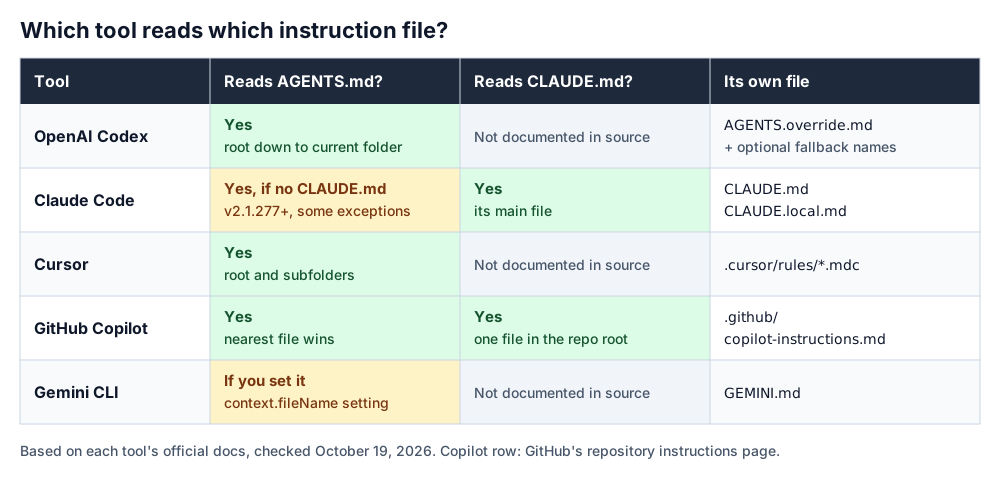
| Tool | Reads AGENTS.md | Reads CLAUDE.md | Its own files | Files in subfolders |
|---|---|---|---|---|
| OpenAI Codex | Yes | Not documented in source | AGENTS.override.md, plus names you add to project_doc_fallback_filenames | Yes, from project root down to your current folder |
| Claude Code | By default only if there is no CLAUDE.md, .claude/CLAUDE.md or CLAUDE.local.md in your working folder or above. Needs v2.1.277+, with exceptions (see below). In those sessions, import it with @AGENTS.md | Yes | CLAUDE.md, .claude/CLAUDE.md, CLAUDE.local.md, .claude/rules/ | Yes, loaded on demand |
| Cursor | Yes, in the root and subfolders | Not documented in source | .cursor/rules/*.mdc (Project Rules), plus User and Team Rules | Yes, combined with parents; more specific wins |
| GitHub Copilot (on GitHub) | Yes, anywhere in the repo | Yes, as an alternative: one file in the repo root | .github/copilot-instructions.md, .github/instructions/NAME.instructions.md | Nearest AGENTS.md takes precedence |
| Gemini CLI | Only if you list it in context.fileName | Not documented in source | GEMINI.md, global in ~/.gemini/GEMINI.md | Yes, scanned when a tool touches that folder |
AGENTS.md in Codex
Codex looks for AGENTS.override.md first, then AGENTS.md, then any fallback names you set in ~/.codex/config.toml. Their example adds TEAM_GUIDE.md. Names not on that list are ignored. Empty files are skipped.
AGENTS.md in Claude Code
Claude Code checks for a CLAUDE.md first. Your ~/.claude/CLAUDE.md, a managed CLAUDE.md and .claude/rules/ files do not count for that check, so they still load next to AGENTS.md. It does not read AGENTS.local.md, AGENTS.override.md or anything under .agents/. To change the default, open /config and set Project instructions to claude-md-and-agents-md, claude-md or managed-only.
Cursor rules
Cursor has four kinds of rules: Project Rules, User Rules, Team Rules and AGENTS.md. Project Rules are .mdc files in .cursor/rules. A plain .md file in that folder is ignored, because it has no frontmatter for description, globs and alwaysApply. If you prefer plain Markdown, Cursor tells you to use AGENTS.md. Older projects may still have a .cursorrules file; Cursor's current rules docs describe .cursor/rules and AGENTS.md and do not mention it.
GitHub Copilot instructions
Copilot's repository-wide file is .github/copilot-instructions.md. Path-specific files go in .github/instructions/, end in .instructions.md and use an applyTo glob in the frontmatter. On GitHub.com, those path-specific files currently work only for Copilot cloud agent and Copilot code review.
Gemini CLI
Gemini CLI reads GEMINI.md by default. You can change the name, or give a list, with context.fileName in settings.json. One note from its docs: for unpaid-tier and Google One users, Gemini CLI was replaced by Antigravity CLI on June 18, 2026.
Where to put the files: nesting and precedence
Every tool here reads more than one file, but they differ in how they combine files and settle conflicts. Codex gives later, more specific files precedence. Claude Code joins all files and may pick either side of a conflict, so avoid contradictions. Cursor gives earlier rule sources priority. Copilot uses the nearest AGENTS.md.
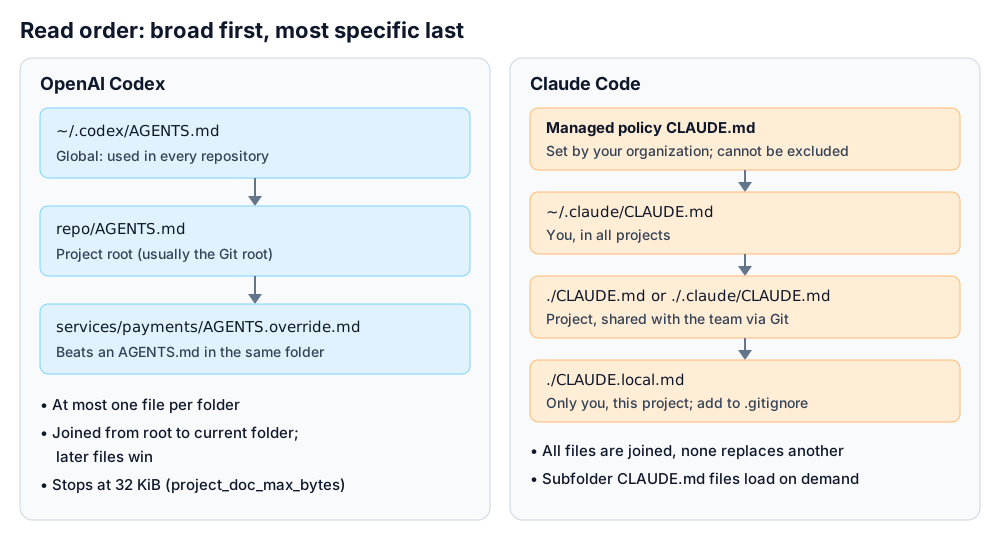
Codex: root down, one file per folder, 32 KiB cap
Codex builds its instruction chain once per run. First the global file in ~/.codex (the override if it exists, otherwise AGENTS.md). Then it walks from the project root, usually the Git root, down to your current folder. It takes at most one file per folder and joins them with blank lines. Files closer to you appear later, so they override earlier guidance.
Codex stops adding files when the combined size reaches project_doc_max_bytes, which is 32 KiB by default. If you hit the cap, raise the limit or split instructions across nested folders.
Claude Code: everything is joined
Claude Code loads CLAUDE.md and CLAUDE.local.md from your working folder and every folder above it. Nothing is overridden; all files are joined. Content runs from the filesystem root down to your working folder, and within one folder CLAUDE.local.md comes after CLAUDE.md. CLAUDE.md files in subfolders load later, when Claude reads or edits a file there. If two instructions conflict, Claude may pick one arbitrarily, so remove contradictions.
Cursor: nested AGENTS.md and rule order
Nested AGENTS.md files apply when you work with files in that folder or below. They are combined with the parent files, and the more specific one takes precedence. For rules, the order is Team Rules, then Project Rules, then User Rules. When they conflict, the earlier source wins.
GitHub Copilot: nearest file, then priority by owner
When Copilot works, the nearest AGENTS.md in the folder tree takes precedence. Across instruction types, personal instructions come first, then repository, then organization. All relevant sets are still sent to Copilot, so GitHub advises against conflicting instructions.
Gemini CLI: global, workspace, then just in time
Gemini CLI loads ~/.gemini/GEMINI.md, then GEMINI.md files in your workspace folders and their parents. When a tool touches a folder, it also scans that folder and its parents up to a trusted root. It joins everything and sends it with every prompt. /memory show prints the combined result.
One file for several agents
If your team mixes tools, keeping three copies of the same rules in sync gets old fast. The docs describe ways to keep one AGENTS.md as the single source. These are the methods they name, nothing more.
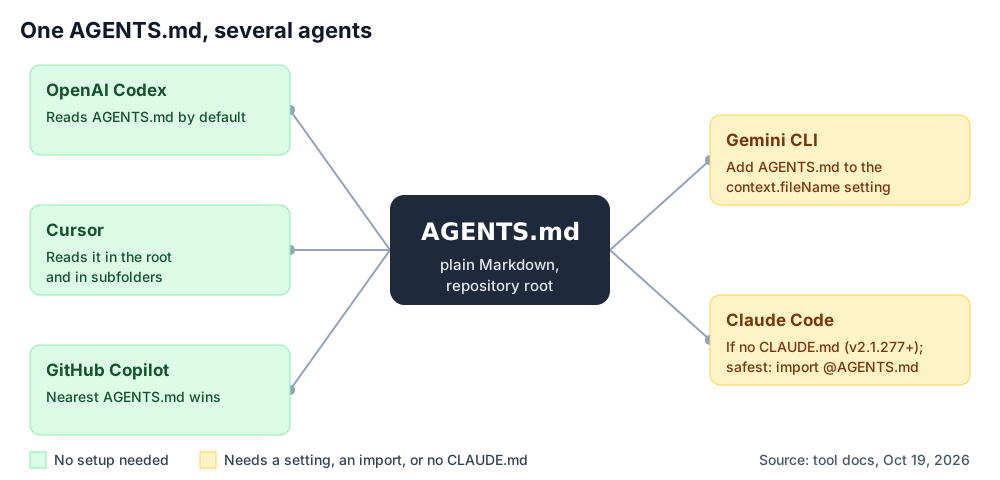
- Codex, Cursor and GitHub Copilot: nothing to do. They read AGENTS.md directly.
- Claude Code without a CLAUDE.md: from v2.1.277, Claude reads AGENTS.md when no CLAUDE.md exists. Watch out: adding a CLAUDE.local.md for personal notes counts as a CLAUDE.md and stops Claude from reading AGENTS.md, unless you set Project instructions to
claude-md-and-agents-md. Anthropic's docs list sessions that read CLAUDE.md files only: versions before v2.1.277, sessions where you disabled the built-in AGENTS.md plugin with/plugin, in some cases the first session after upgrading from v2.1.276 or earlier, and, before v2.1.281, some sessions such as those on Amazon Bedrock or with telemetry disabled. For those, the docs say to update Claude Code and import AGENTS.md from a CLAUDE.md (next step). - Claude Code with Claude-only rules: create a CLAUDE.md next to AGENTS.md that imports it, then add the extra lines below. Claude reads the imported file first.
- Gemini CLI: add AGENTS.md to
context.fileNamein.gemini/settings.json. - Aider: the agents.md site shows
read: AGENTS.mdin.aider.conf.yml.
CLAUDE.md that reuses AGENTS.md (example from the Claude Code docs)
@AGENTS.md

## Claude Code

Use plan mode for changes under `src/billing/`.
.gemini/settings.json (format from the Gemini CLI docs)
{
  "context": {
    "fileName": ["AGENTS.md", "GEMINI.md"]
  }
}
What about a symlink? Claude's docs allow ln -s AGENTS.md CLAUDE.md if you have no Claude-only content. Two catches. Claude's Edit and Write tools refuse to write through a symlink and edit AGENTS.md instead. And on Windows, Git checks out a committed symlink as a plain text file unless core.symlinks is on. That clone then gets a one-line CLAUDE.md instead of your instructions. If anyone who clones the repo works on Windows, the docs recommend the @AGENTS.md import.
After either setup, run /context in a new Claude Code session and check that the file shows up under Memory files.
What to put in it: AGENTS.md and CLAUDE.md best practices
The advice from the vendors and the research points the same way more often than you would expect. In short: commands, boundaries and the habits of your project that differ from the usual. Skip the tour of the folder tree.
From GitHub's analysis of 2,500+ files. Matt Nigh at GitHub looked at over 2,500 agents.md files in public repos. Those were persona files for Copilot custom agents, but the lessons read like general advice: put executable commands early, with flags. Show one real code example instead of three paragraphs. Set clear boundaries; "Never commit secrets" was the most common helpful one. Name your stack with versions. Cover six areas: commands, testing, project structure, code style, git workflow and boundaries.
From the Claude Code docs. Write instructions you can check. "Use 2-space indentation" beats "Format code properly". "Run npm test before committing" beats "Test your changes". Group lines under headings. Keep each file under 200 lines.
From Cursor's docs. Do not paste whole style guides (use a linter), do not list every command the agent already knows (npm, git, pytest), and do not copy code that already lives in the repo. Start simple and add a rule when the agent repeats a mistake.
From the research. Gloaguen et al. found that agents follow the instructions in these files well, but that repository overviews did not help. Their conclusion: context files are useful for non-standard coding practices.
Our take: GitHub lists project structure as one of six areas, while the research found overviews unhelpful. We would only name folders an agent is likely to get wrong, like a hand-written migrations folder. Claude Code's own /doctor checkup points the same way: it proposes cutting directory layouts and dependency lists from a checked-in CLAUDE.md and keeps pitfalls, rationale and conventions that differ from tool defaults.
Here is a short example. It is illustrative only: the project is made up, and it uses no tool-specific syntax, so every tool above can read it.
AGENTS.md — illustrative example for a fictional project
# AGENTS.md

## Commands (run these, in this order)
- Install: `pnpm install`
- Test one package: `pnpm test --filter api`
- Before every commit: `pnpm lint && pnpm test`

## Stack
- Node 22, TypeScript 5 (strict), PostgreSQL 16

## Things that differ from the usual
- Money is stored as integer cents. Never use floats for amounts.
- Migrations in `db/migrations/` are written by hand. Do not generate them.
- Log with `logger` from `src/lib/log.ts`, not `console.log`.

## Boundaries
- Always: add or update tests for code you change.
- Ask first: new dependencies, database schema changes.
- Never: commit secrets, edit files in `vendor/`.
Does an instruction file actually help? What the research says
Two 2026 papers on arXiv tested AGENTS.md-style files. They asked different questions and came to different conclusions. Both summaries below come from the papers' arXiv abstracts.
Faster and cheaper on output
Lulla et al., arXiv:2601.20404 (v2, March 30, 2026)
- 10 repositories, 124 pull requests
- Agents run with and without an AGENTS.md
- Median runtime 28.64% lower with the file
- Output tokens 16.58% lower
- Task completion behavior comparable
No general gain, higher cost
Gloaguen et al., arXiv:2602.11988 (v3, September 29, 2026)
- SWE-bench tasks plus real issues from repos with committed context files
- No general improvement in task success
- Inference cost over 20% higher on average
- Held across LLMs, agents, and both LLM-generated and developer-committed files
- Instructions were well followed
How to read this. The studies measure different things. Lulla et al. look at efficiency: time and tokens. Gloaguen et al. look at whether the task gets solved and what inference costs. The first study is small, with 10 repositories. The setups differ, so the percentages are not directly comparable.
What both support: an agent does act on the file. What neither shows: that a longer file makes the agent better. Gloaguen et al. end with a clear warning. Test any attempt to improve performance before you deploy it.
GitHub's blog post is a different kind of source. It describes patterns in files that work well; it does not report a controlled measurement.
Should you commit it?
Yes for the shared project file, no for personal notes. The docs are clear on which is which.
- Commit the project CLAUDE.md. Anthropic describes it as team-shared instructions, shared through source control. A shared AGENTS.md belongs in the repository for the same reason.
- Do not commit
CLAUDE.local.md. Add it to.gitignore. Note that a gitignored file only exists in the worktree where you created it. To share personal notes across worktrees, import a file from your home folder, such as@~/.claude/my-project-instructions.md. - Cursor says to check your rules into git so the whole team benefits.
- Copilot code review reads instructions from the head branch of a pull request. You can test a changed instruction file in the same PR before you merge.
- Global files stay local.
~/.codex/AGENTS.md,~/.claude/CLAUDE.mdand~/.gemini/GEMINI.mdlive in your home folder, not in the repo.
One safety detail. When a project CLAUDE.md imports a file outside your working folder, Claude Code asks for approval the first time it sees such imports. The docs say this protects you from files other people commit to a shared project.
Setting up your first agent? Our getting started guide to AI pair programming covers installation and first sessions. Choosing between the two most common tools? See Claude Code vs Cursor.
Sources
Every technical claim on this page comes from the sources below, checked on October 19, 2026. Tools change their docs often, so check the version you run.
- AGENTS.md — official site — agents.md
- How Claude remembers your project (CLAUDE.md, AGENTS.md, rules) — Claude Code Docs
- Custom instructions with AGENTS.md — OpenAI Codex docs
- Rules — Cursor Docs
- Adding repository custom instructions for GitHub Copilot — GitHub Docs
- How to write a great agents.md: Lessons from over 2,500 repositories — The GitHub Blog (Matt Nigh, updated November 25, 2025)
- On the Impact of AGENTS.md Files on the Efficiency of AI Coding Agents (Lulla et al., arXiv:2601.20404, v2) — arXiv
- Provide context with GEMINI.md files — Gemini CLI docs
- Evaluating AGENTS.md: Are Repository-Level Context Files Helpful for Coding Agents? (Gloaguen et al., arXiv:2602.11988, v3) — arXiv
Frequently asked questions about AGENTS.md and CLAUDE.md

Written by Marvin Smit
Marvin is a developer and the founder of ZeroToAIAgents. He tests AI coding agents daily across real-world projects and shares honest, hands-on reviews to help developers find the right tools.
Learn more about our testing methodology →Related Guides and Reviews
Setup steps for Cursor, Copilot and Claude Code
Features, pricing and where it fits
The AI code editor in detail
Plans, models and agent features
Side-by-side comparison