Cursor Review 2026
AI-first code editor built on VS Code with intelligent autocomplete and chat-based editing.
Best for: Developers who want AI-powered VS Code with minimal learning curve
Key Takeaways
- Cursor is the leading AI-native code editor with $2B ARR and Fortune 500 adoption
- Composer 2 enables autonomous multi-file editing — the killer feature over Copilot
- Supports GPT-5.4, Claude Opus 4.6, Gemini 3 Pro, and more — true multi-model flexibility
- Pro plan at $20/month is double Copilot's price, but the productivity gains justify it for most developers
- VS Code fork means near-zero learning curve and full extension compatibility
What Is Cursor?
Cursor is an AI-native code editor built on a fork of VS Code, designed from the ground up to make AI a first-class citizen in your development workflow — not an afterthought bolted onto an existing IDE. Since its launch, Cursor has grown into one of the most talked-about developer tools in the industry, now trusted by over half of the Fortune 500 and generating $2B in annual recurring revenue as of early 2026. Version 3.0, released April 2, 2026, brings significant improvements to agent reliability and codebase understanding.
In my testing over the past six months, I've used Cursor daily across projects ranging from small TypeScript utilities to large Next.js applications with hundreds of files. What distinguishes it from extensions like GitHub Copilot is the depth of AI integration: Cursor doesn't just suggest the next line — it understands your entire codebase, reasons about architecture, and can rewrite multiple files in a single coordinated operation. If you're curious about the broader category, our guide on what AI coding agents actually are is a good starting point before diving into tool-specific reviews.
Getting Started
Setup is as painless as any editor. You download Cursor from cursor.com, install it like any desktop app, and on first launch you're offered the option to import your existing VS Code settings — extensions, keybindings, themes, and all. In my experience this import took under 60 seconds and worked flawlessly. If you've spent years customizing VS Code, you will feel at home in Cursor within minutes.
Authentication is handled via GitHub or Google SSO, after which you're dropped into a familiar VS Code-like interface with a new chat panel on the right side. The Hobby plan activates automatically — no credit card required. For teams migrating from other editors, Cursor supports Vim keybindings, Emacs keybindings, and JetBrains key maps, which covers the vast majority of developer preferences.

Key Features in Depth
Tab: Specialized Autocomplete
Cursor's Tab feature is its take on AI autocomplete, but it's significantly more powerful than the line-by-line suggestions you get from older tools. Rather than predicting the next token, Tab uses a model specifically trained on code continuation that understands the surrounding function context, variable names in scope, and patterns elsewhere in the file. In my testing, the acceptance rate was noticeably higher than what I experienced with GitHub Copilot on similar tasks — especially for boilerplate-heavy code like React component props, TypeScript interface definitions, and test scaffolding.
Tab also supports multi-line completions and "edit suggestions" — when you start modifying a function, Cursor will predict not just the line you're on but the downstream changes likely needed in the same block. This feels like autocomplete grew a brain.
Composer 2: The Star Feature
Composer 2, launched March 19, 2026, is what separates Cursor from every IDE extension on the market. It is a fully autonomous coding agent that can plan, write, edit, and verify changes across multiple files simultaneously — without you manually directing each step. You describe a task in natural language ("Refactor the auth module to use JWT instead of session cookies, update all affected API routes, and add tests") and Composer 2 works through it end to end.
In my hands-on testing, I gave Composer 2 a complex task: migrate a REST API endpoint to use Zod schema validation, update the corresponding TypeScript types, fix the downstream consumers, and write unit tests. Tasks that would have taken me 45 minutes manually were completed in under 5 minutes, with minimal corrections needed. The quality was production-ready — not "good enough for a first draft."
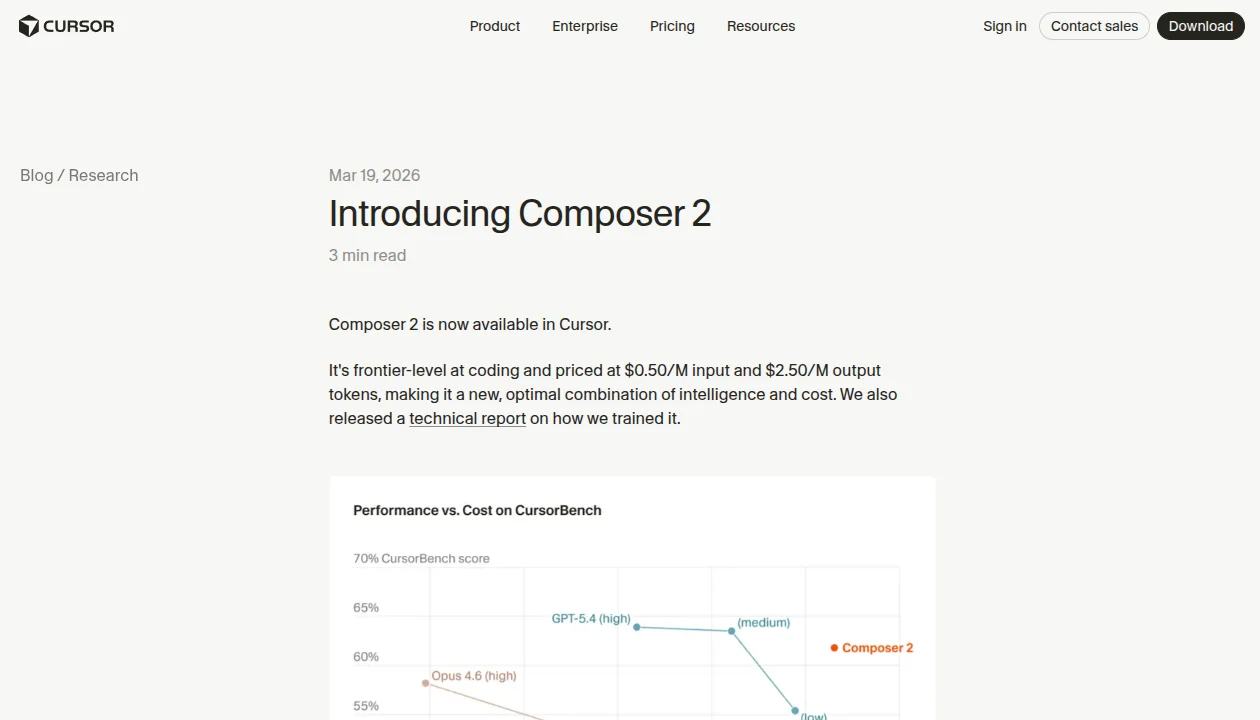
Composer 2 also introduces the autonomy slider — a setting that controls how much Cursor asks for confirmation before making changes. At maximum autonomy, it runs end-to-end and presents you with a finished diff. At minimum autonomy, it checks in at each step. For experienced developers who trust the AI, max autonomy on well-scoped tasks is a revelation. For learning or sensitive codebases, the step-by-step mode is invaluable.
Cloud agents are another major addition: Cursor can now spin up parallel agent instances that run in the background on separate tasks while you continue coding. This is a true paradigm shift — you queue up three refactoring tasks and all three are being worked on simultaneously while you focus on something else. It's the closest I've seen any tool get to the promise of autonomous AI coding agents.
BugBot: AI Code Review on PRs
BugBot is Cursor's GitHub integration for automated PR code review. When a pull request is opened, BugBot analyzes the diff against the codebase context, flags potential bugs, logic errors, and security issues, and leaves inline comments on GitHub — exactly like a senior developer reviewing your code. It's available as a $40/user/month add-on to the Teams plan.
In my testing on a project with an active PR queue, BugBot caught a subtle race condition in async error handling that our human reviewers had missed. That alone was worth the add-on cost for the month. The false positive rate was acceptably low — roughly one unnecessary comment per 20 legitimate ones.
Codebase Understanding via Semantic Indexing
One of Cursor's most underappreciated features is its semantic codebase index. When you open a project, Cursor indexes it using vector embeddings, enabling the AI to answer questions like "Where is user authentication handled?" or "What calls this function?" without requiring you to specify file paths. This is context that extends across your entire repository, not just the open file.
For large monorepos (200k+ lines of code), the initial indexing takes a few minutes and can be slow. But once indexed, codebase-aware questions become dramatically faster and more accurate. It's a meaningful competitive advantage over tools that operate only within the current file or open tabs.
@codebase mention in Cursor's chat to ask questions about your entire project. It indexes your codebase semantically, so you can ask things like "where is the authentication logic?" and get precise file references — much faster than grep.Supported AI Models
One of Cursor's biggest differentiators is true multi-model flexibility. Rather than locking you into a single provider's model, Cursor lets you choose and switch between frontier models per task. As of April 2026, the following models are supported:
| Model | Provider | Best For | Speed |
|---|---|---|---|
| GPT-5.4 | OpenAI | Code generation, broad tasks | Fast |
| Claude Opus 4.6 | Anthropic | Complex reasoning, long context | Medium |
| Gemini 3 Pro | Speed-critical tasks, multimodal | Very Fast | |
| Grok Code | xAI | Experimental, novel approaches | Medium |
| Cursor Auto | Cursor | Balanced performance, auto-selects best model | Fast |
In practice, I use Claude Opus 4.6 for architecture discussions and Composer 2 agent tasks where deep reasoning matters, and switch to Gemini 3 Pro for quick one-off completions where I want sub-second response times. The Cursor Auto model is excellent for beginners who don't want to think about model selection — it routes requests intelligently based on task complexity. MCP (Model Context Protocol) support on Pro plans also allows you to connect Cursor to external tools and data sources, further expanding its capabilities.
Pricing Breakdown
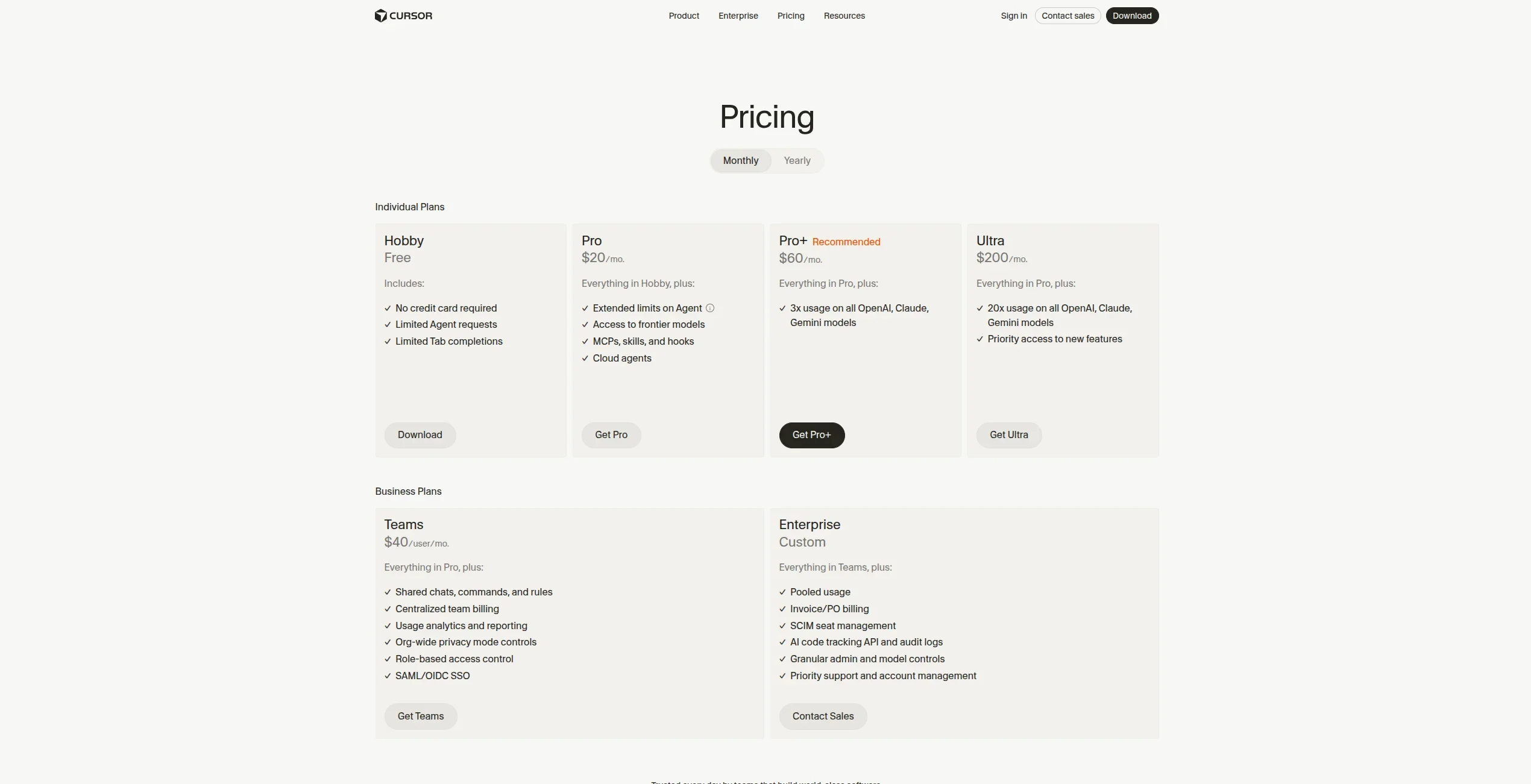
Cursor's pricing spans a wide range, from free to enterprise-grade. Here's the full breakdown as of April 2026:
| Plan | Price | Agent Requests | Key Features | Best For |
|---|---|---|---|---|
| Hobby | Free | Limited | Basic Tab, limited Composer 2 | Trying Cursor out |
| Pro | $20/mo | Extended | Frontier models, MCPs, skills, hooks, cloud agents | Individual developers |
| Pro+ | $60/mo | 3x usage | Everything in Pro, 3x model usage limits | Heavy daily users |
| Ultra | $200/mo | 20x usage | Priority access, maximum limits | Power users, researchers |
| Teams | $40/user/mo | Extended | Shared chats, SAML/OIDC SSO, usage analytics | Engineering teams |
| Enterprise | Custom | Pooled | SCIM, audit logs, priority support, custom contracts | Large organizations |
One important note: Cursor shifted from 500 fixed requests per month to a usage-based credit system in mid-2025. In practice, Pro plan users report approximately 225 effective "large model" agent requests per month under the new system before hitting soft limits. For standard autocomplete and chat, the limits are effectively invisible for most workflows. For details, see Cursor's official pricing page.
Cursor vs The Competition
Cursor operates in an increasingly crowded field of AI coding tools. Here's how it stacks up against the main alternatives:
Cursor vs GitHub Copilot: Copilot is half the price at $10/month and deeply integrated into GitHub workflows. But it remains primarily an autocomplete extension — it lacks Cursor's full-codebase context, Composer 2's autonomous multi-file editing, and model flexibility. For developers who mostly write new code in isolation, Copilot is a reasonable choice. For those doing significant refactoring or working across large codebases, Cursor pulls ahead decisively. See our full Cursor vs GitHub Copilot comparison for the detailed breakdown.
Cursor vs Windsurf: Windsurf (formerly Codeium) is Cursor's closest architectural rival — another AI-first editor with its own agent mode. Windsurf is generally considered faster and slightly cheaper, while Cursor has the edge on Composer 2's reliability and the breadth of supported models. The choice often comes down to personal workflow preferences. Our Cursor vs Windsurf comparison covers this in full detail, and our three-way comparison adds Copilot to the mix.
If you're still deciding which tool is right for you, our guide on how to choose an AI coding agent walks through a practical decision framework. And if budget is a constraint, our analysis of free vs paid AI coding agents will help you determine whether the Pro tier is worth it for your specific use case.
Who Should Use Cursor?
Beginner developers: The Hobby plan is a low-stakes way to experience AI-assisted coding. The VS Code compatibility means you won't need to relearn an unfamiliar environment. Tab completions alone will accelerate learning. The main caveat is that Composer 2's full power requires understanding what you're asking for — beginners may initially get more value from simpler tools.
Intermediate developers: This is Cursor's sweet spot. If you're comfortable with your codebase but want to spend less time on boilerplate, refactoring, and debugging, the Pro plan at $20/month will pay for itself in hours. Multi-file Composer tasks become genuinely useful once you can evaluate and correct AI output.
Senior developers and tech leads: Cursor excels here. The autonomy slider at high settings combined with BugBot on PRs can meaningfully accelerate a team's velocity. Senior devs are well-positioned to scope tasks clearly for Composer 2 and validate its output quickly. Codebase-wide context means you can ask architectural questions and get accurate answers grounded in your actual code.
Engineering teams: The Teams plan at $40/user/month includes SSO, shared chat history, and usage analytics. For organizations already paying for GitHub Copilot Business at $19/user/month, the incremental cost for substantially more capability is modest. The Enterprise tier with audit logs and SCIM provisioning handles the compliance requirements common in regulated industries.
What We Don't Like
No tool is without flaws, and in six months of daily use I've found several genuine weaknesses worth naming honestly:
Usage-based pricing shift created confusion: The mid-2025 move from fixed requests to usage-based credits was poorly communicated and left many Pro plan users feeling misled. The effective number of "large model" agent requests dropped significantly compared to the old system. Cursor has since improved transparency, but the memory of this is a legitimate trust concern.
Performance on large codebases: Cursor can become sluggish — sometimes noticeably laggy — on very large codebases (500k+ lines). Indexing large monorepos takes time, and context window limits mean that on the biggest projects, the AI's codebase awareness degrades. This is partly an LLM limitation rather than a Cursor-specific problem, but competitors handle it with similar constraints.
AI output inconsistency: This is true of all LLM-powered tools, but worth stating: Composer 2 can be brilliant one run and frustrating the next on similar tasks. The non-determinism of LLMs means you can't treat agent output as fully reliable without review. Experienced developers adapt to this naturally; developers newer to AI coding tools sometimes struggle.
Interface complexity: The interface has grown more cluttered with each major release as new features are added. Autonomy slider, cloud agents, MCPs, skills, hooks — there's a lot to configure. For users who just want to code, the feature surface can feel overwhelming. A streamlined beginner mode would help.
Price vs Copilot: At $20/month, Cursor Pro costs exactly double GitHub Copilot's $10/month. For developers who primarily need single-file autocomplete, this premium is hard to justify. The value equation only tips in Cursor's favor once you're regularly using Composer 2 for multi-file tasks.
Our Verdict
After six months of daily use across diverse projects, Cursor earns a strong 4.6/5 from us. It is the best AI code editor available today for developers who want genuine autonomy and codebase-wide intelligence, not just smarter autocomplete.
Composer 2 is genuinely transformative for multi-file refactoring and architectural changes — tasks that used to take hours now take minutes, with output quality high enough to need only light review. The multi-model flexibility (GPT-5.4, Claude Opus 4.6, Gemini 3 Pro, and others) means you're never locked into a single provider's strengths and weaknesses. And the VS Code foundation means adoption friction is as low as it gets for any new developer tool.
The deductions come from the pricing transition optics, performance on very large codebases, and the growing interface complexity. These are real but manageable concerns. For the right developer profile — intermediate to senior, working on non-trivial codebases, willing to invest in learning agent patterns — Cursor Pro at $20/month is one of the highest-ROI tools available today.
The bottom line: If you're evaluating AI coding tools and you regularly work across multiple files, Cursor should be your first choice. If you need only single-file completions and price sensitivity is a constraint, GitHub Copilot or Windsurf's free tier may serve you equally well at lower cost.
Pros & Cons
Pros
- Familiar VS Code interface with AI superpowers
- Excellent inline code suggestions (Cursor Tab)
- Multi-model support (GPT-4, Claude, custom)
- Natural language to code conversion
- Privacy mode for sensitive codebases
Cons
- Subscription required for best features
- Can be slow with very large codebases
- Limited offline functionality
- Some VS Code extensions incompatible
Our Ratings
How Cursor Compares
Not sure Cursor is right for you? See how it stacks up against alternatives.
Verdict
Cursor earns a strong 4.7/5 in our testing. It is our Editor's Choice in the Coding Agents category — a well-rounded tool that delivers real value for the right team.
With a free tier available, there is very little risk in trying it out. If you are evaluating AI coding agents, Cursor deserves serious consideration.
Frequently Asked Questions
Is Cursor free to use?
Is Cursor better than GitHub Copilot?
What AI models does Cursor support?
Can I use my VS Code extensions in Cursor?
Is Cursor suitable for teams?
Sources & References
- Cursor Official Website· Official product page and documentation
- Cursor Pricing· Current pricing plans and feature comparison
- Taskade — Cursor Review 2026· Independent third-party review with pros and cons
- NxCode — Cursor AI Review 2026· Detailed feature analysis and honest verdict
- DigitalOcean — Copilot vs Cursor· Head-to-head comparison of the two leading AI coding tools

Written by Marvin Smit
Marvin is a developer and the founder of ZeroToAIAgents. He tests AI coding agents daily across real-world projects and shares honest, hands-on reviews to help developers find the right tools.
Learn more about our testing methodology →Related AI Agents
Claude Code
Anthropic's official CLI coding agent with deep codebase understanding and autonomous task execution.
Read Review → →GitHub Copilot
GitHub's AI pair programmer with real-time code suggestions and chat assistance.
Read Review → →Windsurf (Codeium)
AI-powered IDE with 'Cascade' AI agent that can understand and edit entire codebases.
Read Review → →