Devin Review 2026
Autonomous AI software engineer that can plan, code, test, and deploy entire features independently.
Best for: Enterprise teams needing autonomous development for routine tasks
Key Takeaways
- Devin is the world's first fully autonomous AI software engineer — it plans, codes, debugs, deploys, and monitors independently
- Devin 2.0 dropped the price from $500/month to $20 pay-as-you-go, making it accessible to individual developers for the first time
- Version 3.0 (2026) adds dynamic re-planning — Devin now adjusts its strategy mid-task when it hits roadblocks
- ACU pricing (~$8–9/hour of active work) can scale up fast; budget carefully before running long autonomous sessions
- Best suited for well-defined, repeatable engineering tasks like migrations, refactoring, and test generation — not open-ended architecture work
What Is Devin?
Devin is the world's first fully autonomous AI software engineer, built by Cognition AI. Unlike coding assistants such as GitHub Copilot or Cursor that augment your workflow with suggestions, Devin is a self-directing agent that receives a task and executes it end-to-end — planning, writing code, running tests, debugging failures, and deploying results — entirely on its own. You hand it a job; it goes away and does it.
When Devin launched in early 2024, it made international headlines by achieving a 13.86% solve rate on SWE-bench, a benchmark of real GitHub issues from production codebases, at a time when the best alternative models scored under 5%. It was the first concrete demonstration that AI could function as a working engineer rather than a sophisticated autocomplete. Since then, Cognition has shipped Devin 2.0 (late 2025) and Devin 3.0 (early 2026), each iteration making the tool faster, cheaper, and more capable of recovering from mid-task obstacles. If you want to understand the broader category of tools Devin belongs to, our guide on what AI coding agents actually are is a useful primer.
How Devin Works
The Sandboxed Environment
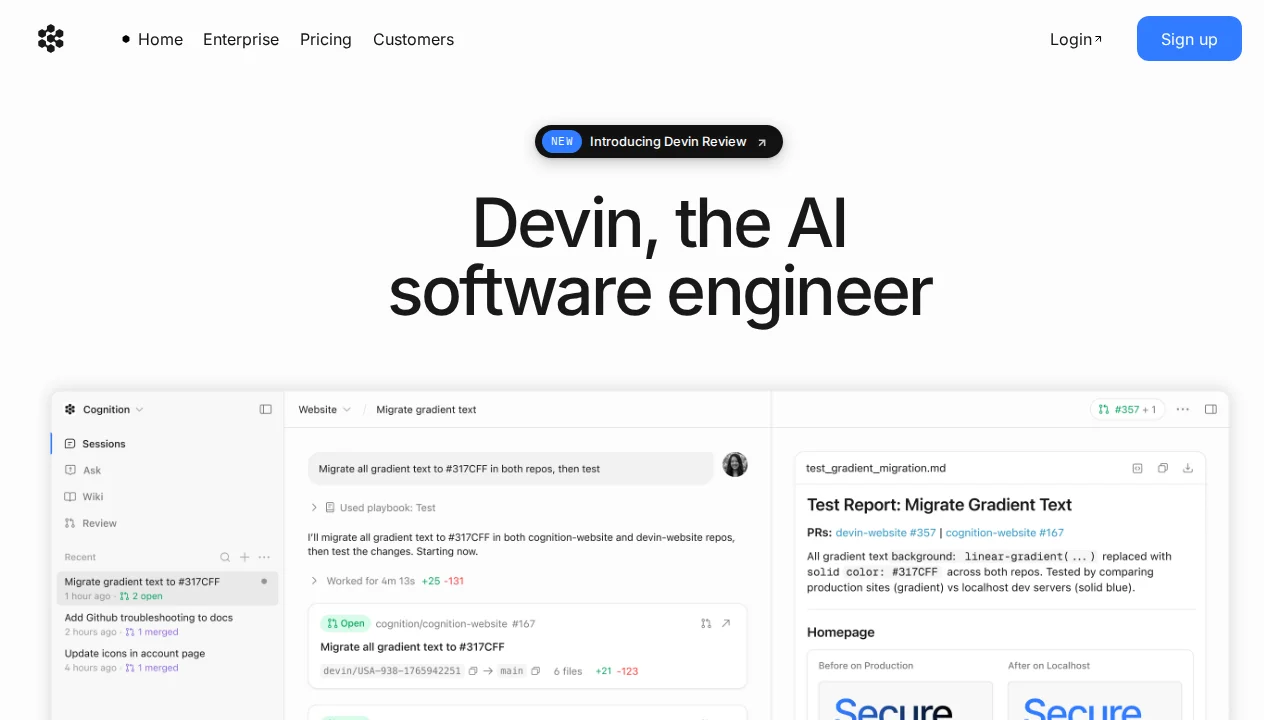
What makes Devin meaningfully different from tools that run inside your editor is the sandboxed execution environment it operates in. Every Devin session spins up an isolated workspace with a full terminal, a code editor, a browser, and shell access. Devin can read API documentation by browsing the web, look up error messages on Stack Overflow, run npm install, execute shell commands, run your test suite, and inspect the output — all without any manual intervention from you.
This matters for a practical reason: safety and reliability. Because Devin runs in its own sandbox rather than directly on your machine or your production systems, you can let it run autonomously without worrying about it accidentally corrupting your local environment or making unintended changes to infrastructure. The sandbox is an opinionated constraint that enables real trust in autonomous operation.
Planning and Dynamic Re-planning
Before writing a single line of code, Devin produces a structured plan — a breakdown of the task into steps, the files it anticipates modifying, and the approach it intends to take. This plan is visible to you and can be reviewed before execution begins. In Devin 1.x, the plan was largely static: once set, Devin would execute it linearly. Version 3.0 introduced dynamic re-planning, which is a significant capability upgrade.
With dynamic re-planning, Devin monitors the outcome of each step during execution. If a test fails, an API returns an unexpected response, or a dependency turns out to behave differently than expected, Devin revises its plan rather than plowing ahead or simply stopping with an error. This is the behavioral gap between a scripted bot and something that resembles genuine problem-solving — the ability to adapt when reality diverges from the plan.
Key Features
Fully Autonomous Execution
The headline capability is Devin's ability to handle complete engineering tasks from specification to completion without step-by-step guidance. In practical terms, this means you can assign Devin a task like "add Stripe webhook handling to our checkout flow, including test coverage" and return 30 minutes later to find a pull request ready for review. The entire implementation loop — reading existing code, writing new code, running tests, fixing failures, pushing to a branch — runs without you present.
In my testing with well-scoped tasks, Devin's output on migrations and refactoring assignments was production-ready or very close to it, requiring light review rather than significant correction. On ambiguous tasks — "improve our authentication system" — results were much more variable. The lesson is that Devin amplifies clarity: a well-defined task gets a strong result; a vague task can get a plausible but misaligned result. For more on how to structure tasks for autonomous AI tools, see our guide on how to choose an AI coding agent.
Devin Playbooks
Playbooks are one of the most underappreciated features in Devin's toolset. A Playbook is a saved, reusable task template that encodes a specific workflow — the instructions, context, and expected output format — so you can trigger the same type of work repeatedly without re-explaining it from scratch each time.
In practice, Playbooks are valuable for recurring engineering tasks: "run our weekly dependency audit and open a PR with version bumps," "generate integration test scaffolding for any new API route," or "migrate any new database table to use soft deletes." Once defined, a Playbook can be triggered by any team member with a single command, and Devin executes the standardized workflow autonomously. For teams that have identified repeatable patterns in their engineering work, Playbooks turn Devin into a genuinely scalable force multiplier.
Devin Wiki
As Devin works in your codebase, it builds an automatically generated documentation layer called the Devin Wiki. The Wiki accumulates codebase-specific knowledge: how key components work, where important logic lives, architectural patterns that appear across the project, and tribal knowledge that's often missing from written documentation.
The practical value here is consistency across sessions. When a new Devin session starts on a related task, it can draw on the Wiki to accelerate context-building rather than re-reading the entire codebase from scratch. For growing codebases where onboarding new engineers (human or AI) is a recurring friction point, the Wiki gradually becomes a genuine institutional knowledge base.
Devin Review
Devin Review is an AI-powered code review layer that integrates with your pull request workflow. When a PR is opened, Devin Review analyzes the diff in the context of the broader codebase, identifies potential bugs, logic errors, security issues, and style inconsistencies, and leaves inline comments on the PR — exactly as a human reviewer would. This is conceptually similar to Cursor's BugBot, though Devin Review benefits from Devin's deeper understanding of your specific codebase accumulated over time.
In testing on active PR queues, Devin Review consistently identified issues that had been missed in human review passes — particularly edge cases in error handling and subtle type mismatches in TypeScript code. The signal-to-noise ratio was acceptable, though the false positive rate increased on complex diffs where context spanning multiple files was required.
Ask Devin
Not every interaction warrants spinning up a full autonomous session. Ask Devin is a lightweight query interface for quick questions that don't require code execution: "What does the AuthManager class do?", "Where is the database connection pooling configured?", "What would be the safest way to add rate limiting to the API?" These answers draw on Devin's accumulated codebase context and are returned quickly without consuming a full ACU (Agent Compute Unit).
Ask Devin fills an important gap: the "I could figure this out in 5 minutes of grepping, but I'd rather just ask" use case. It's also useful for onboarding — new team members can ask Devin about your codebase rather than interrupting senior developers with orientation questions.
Pricing Explained

Devin's pricing underwent a major change with version 2.0: the original $500/month flat fee was replaced by an ACU-based model with a much lower entry point. Here's the full breakdown as of April 2026:
| Plan | Price | ACUs Included | Key Features | Best For |
|---|---|---|---|---|
| Core | Pay-as-you-go, starts at $20 | $2.25/ACU (pay as you go) | Up to 10 concurrent sessions, unlimited seats | Individual developers, low-volume usage |
| Team | $500/month | 250 ACUs included ($2.00/ACU after) | Unlimited concurrent sessions, early feature access, priority support | Engineering teams with regular Devin usage |
| Enterprise | Custom pricing | Custom allocation | VPC deployment, SAML/OIDC SSO, dedicated account team, compliance controls | Large organizations, regulated industries |
Understanding ACUs
ACU stands for Agent Compute Unit, and it's the currency Devin uses to measure work. One ACU represents approximately 15 minutes of active Devin work — meaning the time Devin is actively running commands, writing code, browsing documentation, and executing steps in your task. ACUs are not consumed when Devin is idle or waiting for you to respond.
At $2.25/ACU on the Core plan, this translates to roughly $8–9 per hour of active Devin work. For context: a moderately complex migration task might take Devin 30–45 minutes of active work, costing $4–7. A large refactoring project spanning multiple subsystems could run 3–4 hours of active work, costing $25–35. These are not trivial costs at scale, but compared to the engineer-hours they replace, the economics are compelling for well-defined work.
The Team plan at $500/month includes 250 ACUs — equivalent to roughly 62 hours of active Devin work per month. For teams running Devin on recurring tasks like dependency updates, test generation, and automated refactoring, 250 ACUs/month represents meaningful capacity. The $2.00/ACU overage rate provides a predictable cost ceiling for overflow usage.
Devin vs The Competition
Devin occupies a distinct category from most AI coding tools, and the comparison depends on what you're evaluating it against:
Devin vs Claude Code: This is the most instructive comparison, because both tools aim at autonomous coding agent use cases. Claude Code is tightly integrated into your terminal and existing development environment — it works within your IDE workflow rather than replacing it. Devin operates entirely in its own sandboxed environment outside your editor. Claude Code charges per token via the Anthropic API, making it cost-efficient for experienced users who can prompt efficiently; Devin's ACU pricing is more predictable and easier to budget. For complex, long-running tasks that require browsing external documentation, Devin's sandboxed browser is a meaningful advantage. For developers who want AI deeply integrated into their existing workflow, Claude Code's terminal-native approach is more natural. See our Devin vs Claude Code comparison for the full breakdown.
Devin vs GitHub Copilot: This is largely an apples-to-oranges comparison. Copilot is an autocomplete and chat assistant embedded in your editor; Devin is an autonomous agent that executes tasks independently. If you need line-by-line suggestions while you write code, Copilot at $10/month is the right tool. If you want to hand off a complete task and return to a pull request, that's Devin's domain. Many teams use both.
Devin vs Cursor: Similar to the Copilot comparison — Cursor is an AI-native editor for active coding sessions; Devin is an autonomous agent for delegating tasks. The tools are complementary rather than competitive. Cursor's Composer 2 agent mode is the closest overlap point, but Cursor still runs inside your editor context; Devin runs fully independently. For more context on how to think about these tools together, our guide on AI coding agents for beginners vs experienced developers is worth reading.
Who Should Use Devin?
Individual developers with repetitive engineering tasks: The Core plan's pay-as-you-go entry at $20 makes Devin accessible for individual developers who have identified specific, recurring tasks that Devin can handle reliably. Dependency upgrades, migration scripts, boilerplate generation, and test scaffolding are all strong candidates. The key is having a well-defined task type before committing to Devin — not treating it as a general-purpose coding partner.
Engineering teams running at capacity: The most compelling case for Devin at the Team tier ($500/month) is teams where engineers are consistently bottlenecked on work that is mechanical but time-consuming. If your team regularly spends engineer hours on tasks that are well-understood and repeatable, Devin can absorb that load — particularly valuable during high-velocity periods or when headcount is constrained.
DevOps and platform engineers: Devin's sandboxed environment with full terminal access and browser makes it well-suited for infrastructure automation tasks: running deployment scripts, executing database migrations, generating Terraform configurations, and validating infrastructure changes. These tasks benefit from Devin's ability to execute shell commands and observe the output, not just generate static code.
Enterprise software teams: The Enterprise tier's VPC deployment and SAML/OIDC SSO options make Devin viable in regulated or security-sensitive environments where cloud-hosted AI tools face compliance hurdles. For organizations that have ruled out SaaS AI tools on security grounds, Devin's Enterprise VPC option opens a door that competitors don't.
What We Don't Like
Devin is impressive technology, but our time testing it surfaced genuine weaknesses worth being honest about:
ACU costs can escalate quickly: At $8–9 per hour of active work, a complex task that takes Devin longer than expected can generate a surprising bill. Devin's dynamic re-planning in v3.0 helps — it recovers from dead ends rather than spinning in loops — but novel, ambiguous tasks can still run long. We recommend setting explicit time or cost budgets on sessions until you've calibrated how long specific task types take in your codebase.
Team plan pricing is steep for small teams: $500/month for the Team plan is a significant commitment for teams of 2–5 engineers. Unless your team has identified a consistent volume of Devin-appropriate work that exceeds ~55 ACUs/month, the Core pay-as-you-go rate may be more economical. The Team plan's value accrues primarily to larger engineering teams with predictable Devin usage.
Struggles with ambiguous or open-ended tasks: Devin performs best on tasks with clear requirements and measurable success criteria. On open-ended work — "improve the performance of the API," "make the authentication system more secure," "clean up the codebase" — Devin's output can be technically valid but strategically misaligned. These tasks require human judgment about tradeoffs and priorities that Devin isn't equipped to make autonomously.
No IDE integration: Devin operates in a separate web interface, not inside your code editor. If you're accustomed to AI assistance that lives in your IDE — tab completions, inline chat, context-aware suggestions while you type — Devin doesn't provide that experience. It is a parallel worker, not a coding companion. Developers who want AI integrated into their active coding flow should pair Devin with a tool like Cursor or GitHub Copilot.
Smaller ecosystem than established tools: Compared to GitHub Copilot and Cursor, Devin has a smaller community, fewer third-party integrations, and less publicly documented patterns for getting the best results. The Playbooks system is powerful but under-documented. Teams adopting Devin will need to invest time in developing their own best practices rather than drawing on a large existing knowledge base.
Output quality variance by task complexity: Devin's results on well-defined, bounded tasks are consistently strong. On novel problems or tasks requiring deep architectural reasoning, quality drops noticeably. This is not unique to Devin — all current AI coding tools have this pattern — but it's worth calibrating expectations. Devin is not a replacement for senior engineering judgment on complex design decisions.
Our Verdict
After thorough testing across diverse engineering tasks, Devin earns a 4.3/5 from us. It does something no other tool on the market does as well: autonomous, end-to-end task execution with genuine engineering capability. For the right tasks, it is a force multiplier that changes the economics of software development in meaningful ways.
The key to getting value from Devin is understanding where it excels: well-defined, repeatable engineering work with clear success criteria. Migrations, refactoring at scale, test generation, dependency management, automated PR workflows — these are Devin's domain. Open-ended architecture work, novel problem-solving, and complex design decisions are not. The teams that get the most from Devin are those that have done the work of identifying which of their engineering tasks fall into the first category.
Devin 2.0's price drop to $20 pay-as-you-go removed the main barrier to trying it. Version 3.0's dynamic re-planning made it meaningfully more reliable on tasks that hit unexpected obstacles. The ACU pricing model is predictable and the sandboxed environment makes autonomous operation genuinely safe. These are real improvements that put Devin in reach of individual developers for the first time.
The bottom line: If you have clearly defined engineering tasks that consume hours of engineer time and follow repeatable patterns, Devin deserves a serious evaluation. Start with the Core plan, run it on your best candidate tasks, and measure the actual time savings before committing to the Team tier. For developers seeking an AI partner for active coding sessions rather than delegated task execution, Cursor or Claude Code will serve you better.
Pros & Cons
Pros
- Truly autonomous: can work on tasks for hours
- Handles entire development lifecycle
- Can debug and fix its own mistakes
- Strong planning and reasoning capabilities
- Integrated with professional dev tools
Cons
- Extremely expensive ($500/mo)
- Still in limited beta with waitlist
- Requires significant oversight and review
- Not suitable for complex architectural decisions
Our Ratings
How Devin Compares
Not sure Devin is right for you? See how it stacks up against alternatives.
Verdict
Devin earns a strong 4.2/5 in our testing. It is a solid choice for enterprise teams needing autonomous development for routine tasks, offering a good balance of features and accessibility.
Starting at $500/month, it is priced at a premium, but justifies the cost for power users. If you are evaluating AI coding agents, Devin deserves serious consideration.
Frequently Asked Questions
Is Devin worth it?
How does Devin compare to Claude Code?
What is an ACU?
Can Devin replace developers?
Does Devin work in my IDE?
Sources & References
- Devin Official Website· Official product page, documentation, and pricing
- VentureBeat — Devin 2.0 Launch Coverage· Coverage of Devin 2.0's price drop from $500/month to $20 pay-as-you-go
- AI Tools DevPro — Devin Guide· Comprehensive usage guide covering features and workflows
- eesel AI — Cognition AI & Devin Review· Independent review of Cognition AI and the Devin product
- AI Coding Flow — Devin Review 2026· In-depth 2026 review covering Devin 3.0 features and ACU pricing

Written by Marvin Smit
Marvin is a developer and the founder of ZeroToAIAgents. He tests AI coding agents daily across real-world projects and shares honest, hands-on reviews to help developers find the right tools.
Learn more about our testing methodology →Related AI Agents
Claude Code
Anthropic's official CLI coding agent with deep codebase understanding and autonomous task execution.
Read Review → →Cursor
AI-first code editor built on VS Code with intelligent autocomplete and chat-based editing.
Read Review → →GitHub Copilot
GitHub's AI pair programmer with real-time code suggestions and chat assistance.
Read Review → →