Flowise Review 2026
Open-source drag-and-drop tool for building LLM orchestration flows and chatbots visually.
Best for: Developers building custom LLM applications without writing LangChain code
Key Takeaways
- Flowise is the leading open-source LLM workflow builder, wrapping LangChain into a drag-and-drop visual interface
- Agentflow enables true multi-agent orchestration with human-in-the-loop checkpoints — no code required
- Acquired by Workday in 2025, giving the project enterprise backing while keeping the open-source core intact
- Self-hosting is completely free and production-ready; cloud plans start at $35/month for teams that prefer managed infrastructure
- Ideal for developers and technical teams who want LangChain power without writing Python boilerplate
What Is Flowise?
Flowise is an open-source, drag-and-drop platform that turns LangChain and LlamaIndex components into visual building blocks you can connect without writing code. Launched in 2023 by a two-person team and now backed by Workday following a 2025 acquisition, Flowise has become one of the most starred AI infrastructure repositories on GitHub — a testament to how many developers were looking for exactly this: LangChain's power without LangChain's boilerplate.
In practical terms, Flowise lets you build LLM-powered applications — chatbots, document QA systems, autonomous agents, multi-agent pipelines — by dragging nodes onto a canvas and connecting them with edges. Each node maps to a real LangChain or LlamaIndex abstraction: LLM calls, vector stores, retrievers, memory modules, tools. The result is a live, deployable application exposed as a REST API or embeddable chat widget. If you're new to the broader category of agent orchestration, our guide on what AI coding agents actually are provides useful context before diving into tooling specifics.
Getting Started
Flowise offers two paths to get started. The fastest is the cloud version at flowiseai.com, where a free account gives you access to the canvas immediately — no setup required. For self-hosting, the process is equally accessible: npm install -g flowise followed by npx flowise start gets a local instance running in under two minutes. Docker images are available for containerized deployments, and the documentation includes production-ready guides for Railway, Render, and AWS.
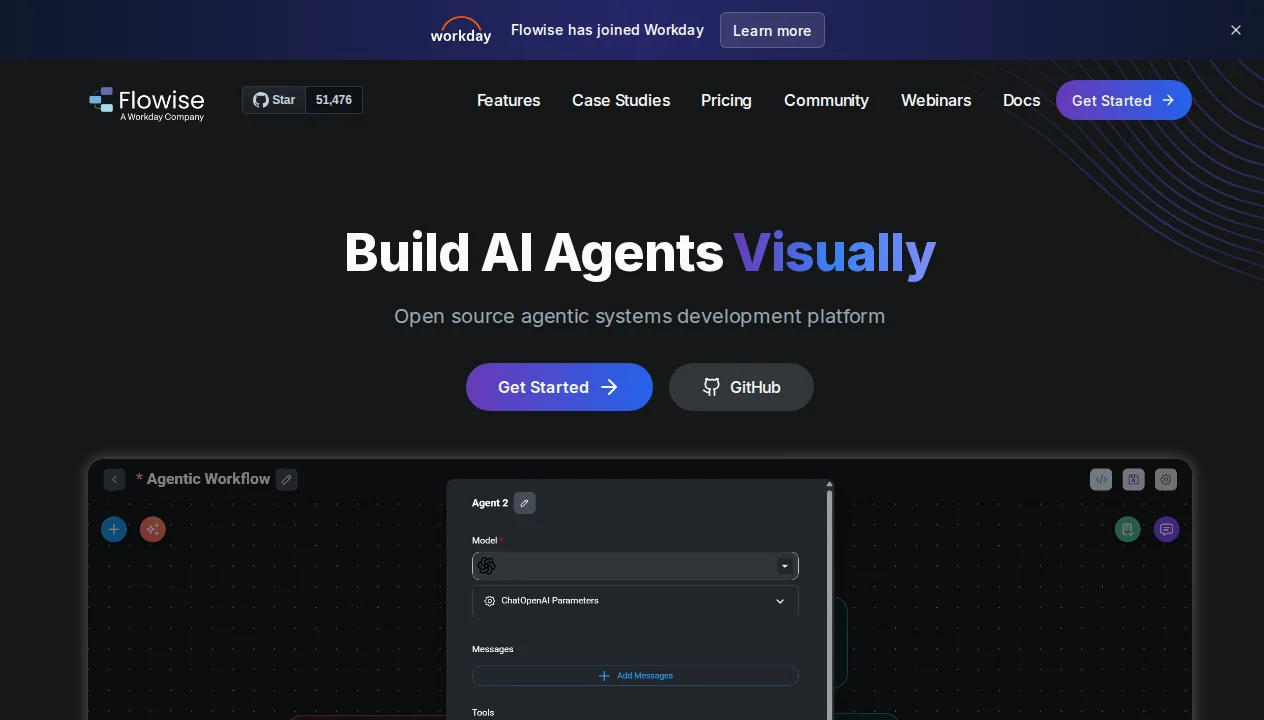
The UI opens to a canvas that will feel familiar to anyone who has used n8n, LangFlow, or similar tools. A left sidebar exposes all available nodes organized by category: Chat Models, Embeddings, Vector Stores, Memory, Tools, Agents, and Utilities. You drag nodes onto the canvas, configure them via right-click panels (entering your OpenAI API key, selecting a vector store, specifying chunk sizes), and connect outputs to inputs with drawn edges. The first time I built a working RAG chatbot in Flowise, it took under 10 minutes from blank canvas to testable endpoint — a genuinely impressive onboarding experience.
Key Features in Depth
Visual Flow Builder
The core of Flowise is its canvas-based flow builder. Every LangChain and LlamaIndex abstraction is represented as a node: OpenAI Chat Model, Pinecone Vector Store, Recursive Text Splitter, Conversational Agent, Tool node, and dozens more. Nodes have typed inputs and outputs — you can't connect an LLM output directly to a Vector Store input because the types won't match — which catches configuration errors before you even run the flow.
What makes the builder more powerful than it appears at first glance is composability. Flows can be nested: you can create a sub-flow that encapsulates a complex retrieval pipeline and reference it as a single node inside a larger agent flow. For teams building multiple applications that share common components (a shared document ingestion pipeline, for example), this modularity is a significant time-saver.
Flows are saved as JSON, which means they're version-controllable. My recommended workflow for teams is to commit flow JSON files to a Git repository alongside the application code they serve — this keeps AI pipeline changes in the same review process as software changes.
Agentflow: Multi-Agent Orchestration
Agentflow is Flowise's answer to multi-agent systems, introduced in v2.0 and significantly matured since. Where the original Flowise focused on single-agent or RAG pipelines, Agentflow supports true orchestration: a Supervisor agent that receives a task, breaks it into subtasks, and dispatches each to a specialized Worker agent. Workers have their own tools, memory, and instructions. The Supervisor collects results and synthesizes a final response.
In my testing, I built a competitive research pipeline: a Supervisor that received a company name, dispatched one Worker to search for recent news (using a web search tool), a second Worker to retrieve information from a local knowledge base, and a third to write a structured summary. The entire pipeline ran autonomously and produced output comparable to what I'd have spent an hour doing manually. Build time for the pipeline was roughly 30 minutes.
Human-in-the-Loop
One of Flowise's most production-critical features is human-in-the-loop (HITL) support within Agentflows. You can insert Interrupt nodes at any point in a multi-agent pipeline that pause execution and surface a checkpoint for human review before proceeding. This is essential for workflows where errors are costly — document approval chains, financial calculations, medical information retrieval — and it's a feature that many competing platforms either lack entirely or implement clumsily.
The HITL implementation in Flowise is clean: interrupted flows are queued in a dashboard where a human reviewer sees the full context up to that point, approves or rejects with optional feedback, and the flow resumes or terminates accordingly. For enterprise use cases requiring audit trails, this is a major selling point.
API Deployment and Integrations
Every Flowise flow is automatically exposed as a REST API endpoint the moment you save it. The API includes authentication support (API key or JWT), rate limiting, and CORS configuration. Embedded chat widgets can be dropped into any web page with a single script tag — Flowise generates the embed code automatically.
For integrations, Flowise supports over 100 tool integrations out of the box: web search, calculator, Wikipedia, SQL database queries, HTTP requests, file system access, and more. Custom tools can be added by writing a simple JavaScript function within the Flowise UI — no deployment pipeline required. For teams already using Make, Zapier, or n8n, Flowise flows can be triggered via webhook, making it composable with broader automation infrastructure.
Self-Hosting vs Cloud
Flowise's open-source self-hosting option is genuinely production-ready — it's not a stripped-down version of the cloud product. You get the full feature set including Agentflow, HITL, all integrations, and the API layer. The main operational overhead is managing the infrastructure: a Node.js server, a database (SQLite by default, PostgreSQL recommended for production), and your chosen vector store.
For most teams with engineering capacity, self-hosting is the economically rational choice. At enterprise scale, the $65/month cloud Pro plan is a rounding error compared to the infrastructure costs of a properly managed self-hosted deployment — but the cloud plan offloads updates, backups, and uptime monitoring. For individuals and small teams exploring Flowise, the free cloud tier (2 flows, 100 predictions per month) is enough to evaluate whether the platform fits your use case before committing to either a paid cloud plan or self-hosted infrastructure.
Pricing Breakdown
Flowise offers both cloud-hosted plans and a self-hosted open-source option. Here's the full pricing breakdown as of April 2026:
| Plan | Price | Flows | Predictions/mo | Storage | Best For |
|---|---|---|---|---|---|
| Self-Hosted | Free | Unlimited | Unlimited | Your own | Teams with DevOps capacity |
| Cloud Free | Free | 2 | 100 | 5 MB | Evaluation and learning |
| Starter | $35/mo | Unlimited | 10,000 | 1 GB | Individual developers and small projects |
| Pro | $65/mo | Unlimited | 50,000 | 10 GB | Teams needing roles and higher volume |
| Enterprise | Custom | Unlimited | Custom | Custom | On-prem, SSO, audit logs, SLA |
Note that "predictions" in Flowise pricing refers to complete API calls to a flow — not individual LLM tokens. A single prediction might involve multiple LLM calls internally (as in a multi-agent flow), so the effective cost per LLM token still depends on your connected AI provider's pricing. Flowise itself doesn't charge per token; it charges per flow invocation. Your OpenAI, Anthropic, or other provider API costs are billed separately.
Flowise vs The Competition
Flowise competes primarily with LangFlow, n8n, and Dify in the visual AI workflow builder space. Each has a distinct positioning:
Flowise vs LangFlow: Both are open-source LangChain-based visual builders with similar feature sets. LangFlow has a somewhat more polished UI and slightly better documentation for beginners. Flowise has a larger community, more mature multi-agent support via Agentflow, and a cleaner self-hosting story. For most users the choice comes down to which UI aesthetics they prefer and which community they find more active.
Flowise vs n8n: n8n is primarily a general-purpose automation platform that added AI capabilities as a module. Flowise is AI-first from the ground up. If your use case is primarily data pipeline automation with AI as one step, n8n's broader integration library is an advantage. If your use case is AI agent orchestration with automation as a peripheral concern, Flowise's LangChain depth gives it an edge. Our n8n AI review covers this distinction in detail.
Flowise vs Dify: Dify is a more product-oriented platform — it includes a built-in app store, annotation tools, and dataset management that Flowise lacks. Flowise is more developer-oriented, with better support for custom tool development and complex LangChain configurations. Teams building customer-facing AI applications may prefer Dify's product layer; engineering teams building internal tools typically prefer Flowise's flexibility.
If you're evaluating AI agent platforms broadly, our guide on how to choose the right AI agent tool walks through a framework applicable to orchestration platforms as well as coding assistants.
What We Don't Like
Prediction limits on cloud plans are conservative: The Starter plan's 10,000 predictions per month sounds generous, but multi-step agent flows can burn through predictions quickly in production. Teams should model their expected call volumes carefully before committing to a cloud tier.
Documentation lags feature development: Flowise releases features quickly, and the documentation often doesn't catch up for weeks. Some of the most useful Agentflow configurations are only documented in GitHub issues and community Discord threads rather than official docs. This is common in fast-moving open-source projects but is a real onboarding friction point.
Debugging complex flows is hard: When a 10-node multi-agent flow produces unexpected output, tracing exactly which node introduced the error requires either LangSmith integration or extensive manual logging. The built-in debugging tools are functional but not as polished as the flow builder itself.
Vendor lock-in concern for Workday-acquired product: Flowise remains open-source, but its acquisition by Workday raises legitimate questions about long-term pricing and feature access. The enterprise tier already restricts on-premises deployment and SSO to custom contracts. Monitoring how the product evolves post-acquisition is prudent.
Our Verdict
Flowise earns a 4.1/5 from us. For developers and technical teams who want to build LLM applications without writing LangChain from scratch, it is one of the best open-source options available. The visual builder genuinely abstracts away significant complexity without sacrificing configurability, and Agentflow's multi-agent orchestration is mature enough for production use cases.
The self-hosted path in particular represents exceptional value: full-featured LangChain orchestration for the cost of the compute you already own. The cloud tiers are reasonably priced for teams that prefer managed infrastructure, though the Starter plan's prediction limits are worth modeling carefully against your expected usage.
The bottom line: If you're building AI-powered applications and want a visual builder that maps directly to LangChain abstractions, Flowise is the strongest open-source option in the market. If you need a more product-oriented platform with built-in dataset management and annotation tools, Dify may be a better fit. For general automation with AI modules, our n8n AI review is worth reading alongside this one.
Pros & Cons
Pros
- Completely free and open-source
- Visual LangChain builder (no coding needed)
- Easy chatbot deployment
- Built-in vector database support
- Growing library of templates
Cons
- Limited compared to coding frameworks
- Hosted version is expensive ($35+/mo)
- Documentation could be better
- Fewer integrations than enterprise tools
Our Ratings
Verdict
Flowise earns a strong 4.3/5 in our testing. It is a solid choice for developers building custom llm applications without writing langchain code, offering a good balance of features and accessibility.
With a free tier available, there is very little risk in trying it out. If you are evaluating AI no-code builders, Flowise deserves serious consideration.
Frequently Asked Questions
Is Flowise free to use?
Does Flowise require coding knowledge?
What AI models does Flowise support?
Can Flowise be used in production?
How does Flowise's acquisition by Workday affect the open-source version?
Sources & References
- Flowise Official Website· Official product page, documentation, and cloud pricing
- Lindy.ai — Flowise Pricing Guide· Independent breakdown of Flowise cloud pricing tiers
- Cybernews — Flowise AI Review· Third-party review covering features, pros, and cons
- HeyOrai — Flowise AI Tool Profile· Community tool profile with user ratings and use cases
- Sider.ai — Flowise AI Review 2025· Detailed 2025 review covering open-source LLM builder landscape

Written by Marvin Smit
Marvin is a developer and the founder of ZeroToAIAgents. He tests AI coding agents daily across real-world projects and shares honest, hands-on reviews to help developers find the right tools.
Learn more about our testing methodology →Related AI Agents
n8n AI
Open-source workflow automation platform with powerful AI agent building capabilities.
Read Review → →Relevance AI
No-code platform for building and deploying custom AI agents with tools and memory.
Read Review → →Make (with AI)
Visual automation platform with AI modules for building intelligent workflows without code.
Read Review → →