n8n AI Review 2026
Open-source workflow automation platform with powerful AI agent building capabilities.
Best for: Technical teams wanting full control over AI automation workflows
Key Takeaways
- n8n is the only major workflow automation platform offering a fully self-hosted option — free with unlimited executions and complete data control
- 400+ integrations (1,202 total nodes) plus LangChain-native AI agent support make n8n the most flexible AI workflow builder available
- Human-in-the-loop support (January 2026) enables real-world agent deployments that pause for human approval before critical actions
- Cloud pricing is competitive for low-to-medium volume but becomes expensive at enterprise scale — self-hosted is the answer at high execution counts
- The visual builder combined with custom code nodes gives both non-technical and engineering teams a single tool that scales from simple automations to complex multi-agent pipelines
What Is n8n?
n8n is an open-source workflow automation platform with native AI agent capabilities. Originally built as a "Zapier but self-hostable" alternative, n8n has evolved significantly in 2025-2026 into a serious platform for building AI-powered workflows and autonomous agents. It combines a visual drag-and-drop workflow builder with the ability to write custom JavaScript or Python code, LangChain-native AI integration, 400+ third-party service connections, and the unique advantage of being fully self-hostable at zero licensing cost.
For developers building AI agents, n8n occupies a distinctive position in the landscape. Unlike Cursor (an AI code editor) or Claude (a reasoning model), n8n is an orchestration layer — the infrastructure that connects AI capabilities to your data, services, and workflows. If you're building a system where an AI needs to read emails, query a database, call an API, send notifications, and loop back based on results, n8n is the kind of tool that makes that feasible without building the orchestration infrastructure from scratch. Our guide on what AI coding agents actually are and our guide on how to choose the right tool provide useful context for where n8n fits in a broader AI development stack.
I've used n8n to build and maintain production AI workflows for eight months — from simple AI-assisted data processing pipelines to multi-agent systems with human approval steps. This review reflects that hands-on experience.
Getting Started
There are two ways to start with n8n: the cloud offering at n8n.io or self-hosted on your own infrastructure. Cloud signup is straightforward — email registration, a 14-day trial of the Pro plan, and you're in the visual editor within two minutes. For self-hosted, the recommended path is Docker: a single docker run command has n8n running locally or on a server in under five minutes, with a full SQLite database included. PostgreSQL is recommended for production self-hosted deployments.
The learning curve is real. The visual builder is intuitive for simple linear workflows (Trigger → Action → Action), but n8n's power comes from its branching logic, looping constructs, sub-workflows, error handling paths, and AI agent nodes — all of which require time to understand deeply. Budget several hours of exploration before expecting to build complex workflows confidently. The extensive documentation and active community (GitHub Issues, Discord, Reddit) make the learning path manageable, but there's no pretending it's plug-and-play for advanced use cases.
Key Features in Depth
AI Agent Nodes and LangChain Integration
n8n's native LangChain integration is its most significant technical differentiator. Rather than requiring you to write Python code to wire up LangChain components, n8n exposes them as visual nodes that you can connect in the workflow builder. The AI Agent node supports tool use, memory, and multi-step reasoning — you configure the model, attach tools (web search, database queries, API calls), connect a memory store, and n8n handles the LangChain orchestration.
In practice, I built a customer support AI agent in n8n that: receives incoming support emails via webhook, extracts the key question using an LLM, searches a knowledge base (vector store node), retrieves relevant documentation, generates a draft response, checks confidence, and either sends the response automatically (high confidence) or escalates to a human queue (low confidence). This entire workflow took approximately four hours to build — infrastructure work that would have required days of custom Python development. The visual representation also makes it easy to explain and hand off to other team members.
n8n supports 70+ dedicated AI nodes including: AI Agent (main orchestrator), Chat Memory nodes (window buffer, summary, token buffer), Document Loaders, Text Splitters, Embeddings nodes (OpenAI, Cohere, HuggingFace), Vector Store nodes (Pinecone, Qdrant, Supabase, Weaviate), and LLM nodes for all major providers. The breadth of supported AI infrastructure is comprehensive — covering the full RAG pipeline and agent loop without leaving the platform.
Human-in-the-Loop (January 2026)
Human-in-the-loop support, added in January 2026, is the feature that moved n8n from a tool for building toy agents to a platform viable for production AI deployment. The Wait node can pause a workflow execution indefinitely, waiting for a human to approve, reject, or modify an action before the workflow continues. The workflow instance is preserved in the database, consuming no execution quota while waiting.
This addresses the most critical practical limitation of autonomous AI agents: the risk of consequential automated actions without oversight. With human-in-the-loop, you can build agents that handle 80% of cases autonomously and escalate the ambiguous 20% to a human — the optimal production architecture for most real-world deployments. The ability to build this pattern visually in n8n, rather than coding it from scratch, is a significant time savings.
400+ Integrations (1,202 Total Nodes)
n8n's integration library is comprehensive. The 400+ direct integrations cover every major cloud service category: CRM (Salesforce, HubSpot, Pipedrive), communication (Slack, Teams, Discord, Gmail), databases (PostgreSQL, MySQL, MongoDB, Redis), cloud platforms (AWS, GCP, Azure), developer tools (GitHub, GitLab, Jira, Linear), payment (Stripe, PayPal), and data (Airtable, Google Sheets, Notion). The HTTP Request node extends this further to any service with a REST API.
The practical implication for AI agent development is that your agents can interact with the real services your organization uses without writing integration code. An AI agent that needs to create a GitHub issue, update a Jira ticket, send a Slack notification, and log to a database can do all of this through configured nodes rather than custom API clients. For teams building enterprise AI workflows, this connectivity is one of n8n's strongest competitive advantages over coding frameworks like LangChain directly.
Self-Hosted: The Unique Value Proposition
n8n's self-hosted option — fully free and open-source under the Sustainable Use License — is unlike anything available from competing automation platforms. Zapier, Make (formerly Integromat), and similar tools are SaaS-only. n8n self-hosted gives you:
Unlimited executions — no per-execution pricing, no monthly caps. Full data control — workflow data, credentials, and execution logs never leave your infrastructure. Zero licensing cost — the platform itself is free; you pay only for infrastructure. Customizability — you can write custom nodes in TypeScript and contribute them back or keep them private. Compliance — for organizations with strict data residency requirements, self-hosted is often the only acceptable option.
For developers with technical infrastructure skills, self-hosted n8n on a $20/month VPS handles significant workflow volume with no platform licensing cost. The economics compared to SaaS automation tools are compelling at scale.
Visual Builder + Custom Code Nodes
n8n's dual-mode development model — visual nodes for most operations, code nodes for custom logic — is a genuine competitive advantage. Most workflow steps use visual nodes that non-technical team members can understand and modify. Where you need custom logic beyond what a node provides, the Code node (JavaScript or Python) lets you write arbitrary code with full access to the execution context and data from previous nodes.
This hybrid model means n8n scales from simple automations (that a business analyst can maintain) to complex multi-agent pipelines (that require engineering expertise) in a single platform. Competing tools typically force you to choose between visual simplicity and code flexibility — n8n provides both.
Pricing Breakdown
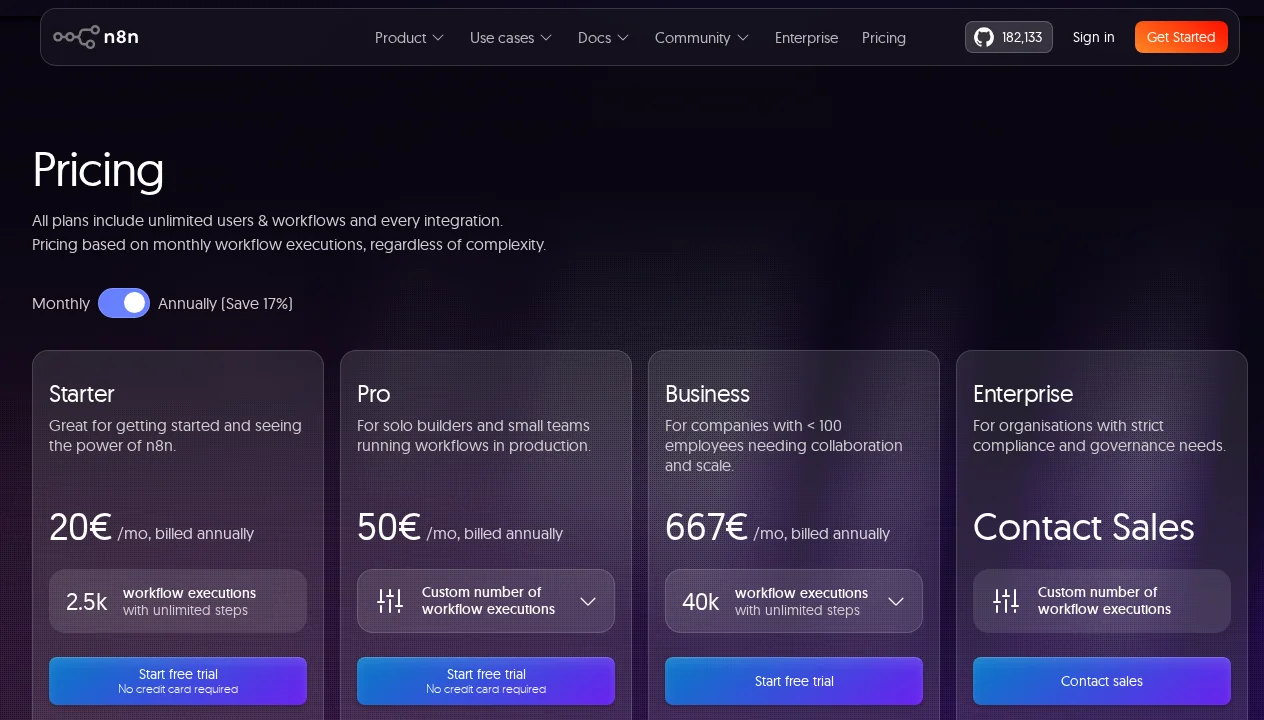
| Plan | Price | Executions/Month | Key Features | Best For |
|---|---|---|---|---|
| Self-Hosted (Community) | Free | Unlimited | All core features, no limits, full data control | Technical teams, data-sensitive orgs |
| Starter | €24/mo | 2,500 | Cloud hosting, basic support, core workflows | Individuals, small projects |
| Pro | €60/mo | 10,000 | Unlimited workflows, extended execution history, AI features | Growing teams, active automations |
| Business | €800/mo | 40,000 | SSO, SAML, advanced permissions, priority support | Enterprise deployments |
The pricing math favors self-hosted heavily for high-volume use cases. 40,000 executions/month at €800 on the Business plan is €0.02 per execution — add infrastructure costs for self-hosted (a $40/month VPS handles this volume comfortably) and the cloud plan costs 20x more per execution. For organizations comfortable managing infrastructure, self-hosted becomes compelling above a few thousand monthly executions.
See n8n's official pricing page for current rates and the execution quota calculator.
n8n vs The Competition
n8n vs Zapier: Zapier is easier to use and has slightly more polished pre-built integrations for business users. n8n wins on cost (especially self-hosted), flexibility (custom code nodes, complex branching), and AI capabilities. For non-technical users building simple automations, Zapier has less friction. For developers building complex AI-powered workflows, n8n's flexibility and cost structure are compelling advantages.
n8n vs Make (formerly Integromat): The closest feature-for-feature competitor. Make has a more intuitive visual builder and slightly better polish on certain integrations. n8n has the self-hosted advantage, better native AI support, and a more active open-source community. For teams with technical infrastructure capability, n8n typically wins on the total cost of ownership calculation.
n8n vs LangChain/LangGraph directly: LangChain gives you more control and is more appropriate for complex agent architectures that require custom orchestration logic. n8n's LangChain integration handles a large percentage of real-world use cases with dramatically less development time. The right choice depends on complexity: n8n for production-grade business automations and moderate-complexity agents, LangChain directly for cutting-edge agent research or highly custom architectures.
If you're assessing which AI tools to build into your stack, our guide on how to choose the right AI tool provides a structured framework.
Who Should Use n8n?
Developers building AI-powered business automation: If you're connecting AI capabilities to real business systems — CRMs, databases, communication platforms, data sources — n8n is the most practical platform for doing so without building orchestration infrastructure from scratch. The combination of AI nodes, 400+ integrations, and custom code capability covers the vast majority of real-world automation requirements.
Organizations with data privacy requirements: The self-hosted option is unique in the automation platform space. If your workflow processes sensitive data (customer PII, healthcare information, financial records) that cannot leave your infrastructure, n8n self-hosted is often the only viable automation platform. Competitors require SaaS-hosted processing.
Teams running high execution volumes on a budget: At scale, the economics of self-hosted n8n versus SaaS automation tools are overwhelming. If you're running tens of thousands of workflow executions monthly, the infrastructure cost of self-hosting is a fraction of equivalent SaaS plan pricing.
Mixed technical/non-technical teams: The visual builder makes workflows comprehensible to non-engineers, while code nodes give engineers the flexibility they need. A single platform that both product managers can read and engineers can extend is genuinely valuable for reducing tool fragmentation.
What We Don't Like
Steep learning curve for complex workflows: n8n is approachable for simple linear workflows but becomes significantly more complex when you need advanced features: sub-workflows, error handling with retries, complex branching logic, looping with break conditions, and multi-agent architectures. The documentation covers everything, but there's a real investment required to build confidently at this level. Budget 20-40 hours of learning time before attempting production complex agent workflows.
Cloud pricing adds up at scale: The Starter plan's 2,500 executions/month sounds generous until you realize that a single workflow run with 10 nodes consumes 10 executions. Real-world business automation quickly reaches execution limits on lower-tier plans. At €800/month for the Business plan, cloud n8n is more expensive than alternatives for teams running high volumes without self-hosting capability.
Technical setup required for self-hosted: The self-hosted option is free and powerful, but it requires Docker knowledge, infrastructure management, and operational responsibility. Database backups, upgrades, monitoring, and security patching fall to your team. For organizations without infrastructure engineering capacity, the operational overhead of self-hosted may outweigh the cost savings.
UI can feel cluttered: The workflow editor surface becomes visually complex on large workflows. With 30+ nodes and multiple branching paths, the canvas can be difficult to navigate and understand at a glance. n8n provides sub-workflows as a structural tool to manage this complexity, but the visual clutter on large workflows is a genuine usability concern.
Limited mobile support: n8n is built primarily for desktop use. The mobile experience for monitoring and managing workflows is functional but not optimized for small screens. For teams that need to manage automations from mobile devices, this is a real limitation.
Our Verdict
After eight months of production use, n8n earns a 4.4/5. It is the most powerful and flexible open-source workflow automation platform available, and its LangChain-native AI integration makes it the best tool in its category for building production AI agents that connect to real business systems.
The self-hosted option's combination of unlimited executions, complete data control, and zero licensing cost is a genuine competitive moat — there is no other platform in this space that offers comparable capability at this cost structure. Human-in-the-loop support brings production viability to AI agent deployments that were previously too risky to run autonomously. The 400+ integrations mean your agents can actually interact with the systems your business uses.
The deductions reflect real friction: the steep learning curve for complex workflows, the operational overhead of self-hosted, and the visual clutter that appears on large workflows. These are manageable with investment, but they're real costs that should be factored into adoption decisions.
The bottom line: If you're building AI agents that need to connect to multiple business services, process real business data, and run reliably in production — n8n is the tool that makes this feasible without building orchestration infrastructure from scratch. Start with the cloud trial to validate your use case, then self-host if the economics justify it. For simpler coding workflows and agentic programming tasks, pair n8n with a dedicated coding tool like Cursor for the implementation work that lives in your codebase.
Pros & Cons
Pros
- Fully open-source (can self-host for free)
- 400+ pre-built integrations
- Visual workflow builder is intuitive
- Supports multiple AI models
- Active community and extensions
Cons
- Self-hosting requires technical knowledge
- UI can be overwhelming for beginners
- Some advanced features require coding
- Hosted version more expensive at scale
Our Ratings
Verdict
n8n AI earns a strong 4.6/5 in our testing. It is our Editor's Choice in the No-Code Builders category — a well-rounded tool that delivers real value for the right team.
With a free tier available, there is very little risk in trying it out. If you are evaluating AI no-code builders, n8n AI deserves serious consideration.
Frequently Asked Questions
Is n8n really free for self-hosted?
How does n8n compare to Zapier for AI workflows?
What is human-in-the-loop in n8n?
How many integrations does n8n support?
Is n8n suitable for non-technical users?
Sources & References
- n8n Official Website· Official product page, documentation, and template library
- n8n Pricing· Current cloud pricing plans and execution quota details
- Hackceleration — n8n Review· Independent review covering AI agent capabilities and limitations
- dev.to — n8n Review 2026: 8 Months Building AI Agents· Extended hands-on review from a developer building production AI agents
- AI Tool Analysis — n8n Review· Detailed feature analysis and comparison with competing automation platforms

Written by Marvin Smit
Marvin is a developer and the founder of ZeroToAIAgents. He tests AI coding agents daily across real-world projects and shares honest, hands-on reviews to help developers find the right tools.
Learn more about our testing methodology →Related AI Agents
Flowise
Open-source drag-and-drop tool for building LLM orchestration flows and chatbots visually.
Read Review → →Relevance AI
No-code platform for building and deploying custom AI agents with tools and memory.
Read Review → →Make (with AI)
Visual automation platform with AI modules for building intelligent workflows without code.
Read Review → →