Relevance AI Review 2026
No-code platform for building and deploying custom AI agents with tools and memory.
Best for: Non-technical teams building custom AI agents quickly
Key Takeaways
- Relevance AI is a no-code multi-agent builder rated 4.5–4.7 on G2, widely adopted for sales and GTM automation
- The Agent Workforce feature orchestrates multi-agent pipelines — from lead generation to qualification to outreach — without writing code
- A dual credit system (Action credits + Vendor credits) gives granular cost control but requires careful planning to avoid surprises
- The free tier (200 actions) is enough to validate use cases; the Team plan at $349/month targets serious automation teams
- Best suited for revenue operations, sales, and marketing teams — not a developer-first platform
What Is Relevance AI?
Relevance AI is a no-code platform for building AI agents and multi-agent teams, primarily targeting business and revenue operations teams rather than developers. Founded in 2019 and headquartered in Sydney, it has built a strong reputation in the sales automation space — its multi-agent orchestration model, where specialized agents hand off work across a lead generation → qualification → outreach pipeline, is one of the clearest implementations of practical agent collaboration available in a no-code tool today.
On G2, Relevance AI holds ratings between 4.5 and 4.7 stars across hundreds of reviews, with particular praise from revenue operations and marketing teams. The platform is less about building custom LLM applications (as Flowise does) and more about deploying pre-designed agent roles — Researcher, Outreach Writer, Lead Qualifier — that collaborate toward a business outcome. If you're evaluating AI agent platforms for the first time, our guide on what AI agents actually are and how they work is a useful primer before diving into platform specifics.
Getting Started
Signing up for Relevance AI at relevanceai.com takes under two minutes — email or Google SSO, and you're in. The onboarding flow immediately prompts you to describe what you want your AI agent to do: "qualify inbound leads," "research prospects and write personalized outreach," "answer customer questions from a knowledge base." Based on your description, Relevance AI suggests pre-built agent templates that you can deploy in one click or customize from.
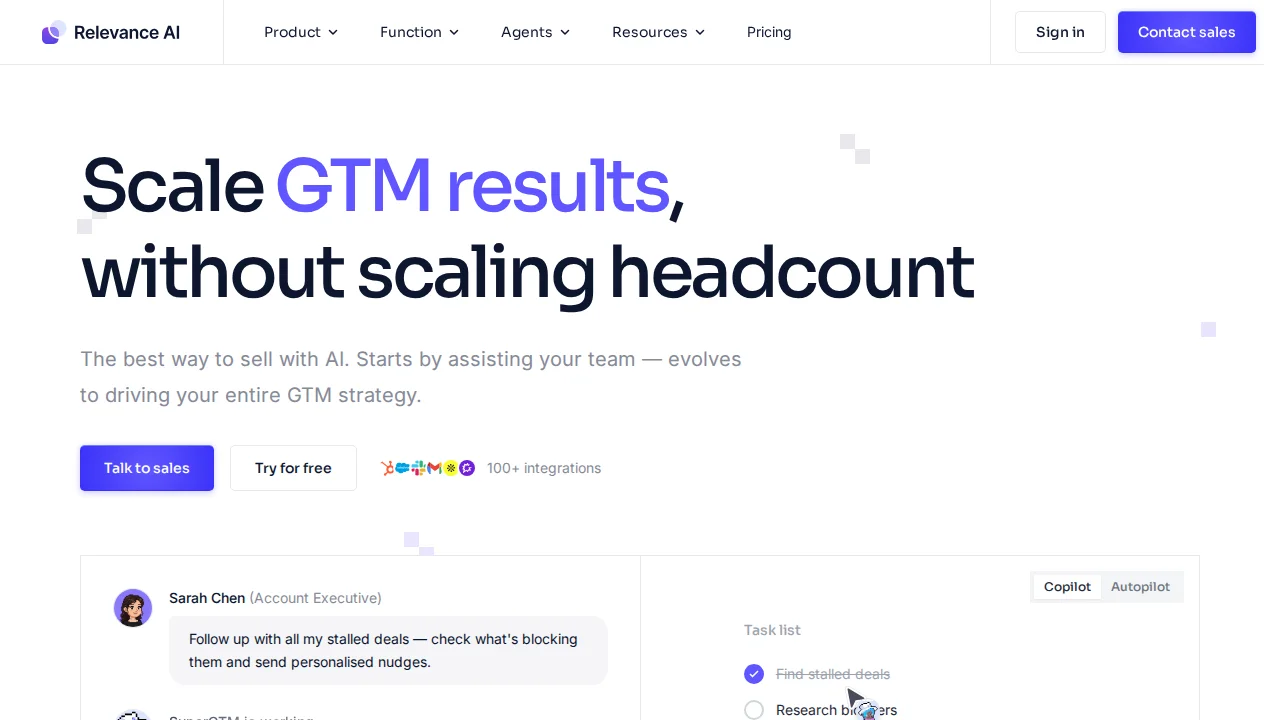
The interface is clean and business-user oriented. A left sidebar navigates between Agents, Tools, Data Tables, and Notebooks. The agent builder is a form-based configurator rather than a visual canvas — you define an agent's role (its system prompt in plain English), attach tools it can use (web search, email sender, CRM read/write, spreadsheet access), set its escalation conditions, and publish. There's no node graph to learn, which makes the first 10 minutes significantly more accessible than canvas-based tools — at the cost of less visual intuition for complex pipelines.
Key Features in Depth
Agent Workforce: Multi-Agent Orchestration
The Agent Workforce is Relevance AI's flagship feature and what most distinguishes it from simpler chatbot builders. A Workforce is a collection of AI agents that can collaborate, hand off tasks, and specialize. The canonical example — and one the platform is genuinely good at — is a B2B sales prospecting pipeline:
- A Researcher agent receives a target company name, uses web search tools to gather recent news, firmographics, and relevant signals
- A Qualifier agent evaluates the research against your ICP criteria and scores the prospect
- An Outreach agent generates a personalized first-touch email using the research context
- A CRM agent logs the prospect, score, and draft email to your CRM
In my testing, a four-agent Workforce like this processed 50 prospect companies in under an hour with minimal intervention — output that would have required two or three hours of manual research and writing work. The personalization quality was meaningfully better than template-based outreach because each email incorporated real, recent company context.
The platform supports both sequential Workforce patterns (Agent A → Agent B → Agent C) and parallel execution, where a Manager agent dispatches tasks to multiple Worker agents simultaneously and synthesizes results. For complex research or analysis workloads, parallel execution dramatically reduces end-to-end time.
Tool Library and Integrations
Relevance AI agents act by calling Tools — pre-built integrations with external services and capabilities. The tool library includes web search, URL scraping, LinkedIn data retrieval, email sending (via Gmail or Outlook), spreadsheet read/write, CRM integrations (HubSpot, Salesforce, Pipedrive), Slack messaging, and HTTP request tools for custom API calls.
Creating custom tools is done through the Relevance AI "Tool Builder" — a code-light interface where you define inputs, write a JavaScript or Python function body, and test against live data. Compared to writing LangChain tool integrations from scratch, this represents a significant time saving, though it requires comfort with basic scripting concepts. The tool testing interface (run a tool with specific inputs, see raw output) is one of the most polished parts of the platform.
Data Tables and Knowledge
Relevance AI includes a built-in Data Tables feature — essentially a lightweight database layer that agents can read from and write to. For teams building lead management workflows, this means you can maintain a "prospect" table that agents populate with research, qualification scores, and outreach drafts, all queryable and exportable to CSV or directly synced to your CRM.
For knowledge retrieval, Relevance AI supports document uploads and URL scraping that are automatically chunked, embedded, and stored in a managed vector store. Agents can retrieve relevant chunks using semantic search — enabling document QA and knowledge-grounded responses without any infrastructure management. This is less flexible than Flowise's explicit vector store configuration but significantly easier for non-technical users to maintain.
Human-in-the-Loop and Escalation
Agents in Relevance AI can be configured with escalation conditions — situations where they should pause and surface a decision to a human. Common patterns include: escalating when a prospect scores above a certain threshold (moving from AI outreach to human follow-up), escalating when a tool call fails, or escalating when an agent's confidence is below a defined threshold.
Escalations are delivered to a human inbox within the Relevance AI dashboard, via email, or via Slack. The human reviewer sees full agent context, can provide feedback, approve or modify the proposed action, and the agent continues. For revenue operations teams that need oversight on high-value actions like CRM updates or email sends, this is a production-critical feature.
The Dual Credit System Explained
Relevance AI uses a two-part billing model that confuses many new users and is worth understanding clearly before committing to a plan:
Action Credits track what your agents do — each agent step, tool call, or data operation costs Action Credits. These credits directly map to the plan tier you purchase.
Vendor Credits track AI model costs — when an agent calls GPT-4o or Claude 3.5 Sonnet, the underlying API cost is covered by Vendor Credits. Relevance AI pre-purchases bulk model capacity and passes it through at a markup.
The practical implication: a single "action" in a complex agent might consume multiple Vendor Credits depending on which model is used and how much context is passed. Teams building GPT-4o-heavy workflows will exhaust Vendor Credits faster than Action Credits. Teams using smaller models (GPT-4o-mini, Claude Haiku) get significantly more effective throughput per plan. The platform provides a credit usage dashboard that shows consumption by agent and model, which helps with planning — but modeling this upfront before purchasing a plan tier is important.
Pricing Breakdown
| Plan | Price | Action Credits/mo | Key Features | Best For |
|---|---|---|---|---|
| Free | Free | 200 | All core features, 1 user | Evaluation and proof-of-concept |
| Pro | $29/mo | Increased | Unlimited agents, priority support | Individual power users |
| Team | $349/mo | High volume | Multiple users, shared Workforces, analytics | Revenue operations teams |
| Enterprise | Custom | Custom | SSO, audit logs, SLA, custom models, dedicated CSM | Large organizations |
The jump from Pro ($29/month) to Team ($349/month) is steep and may catch growing teams by surprise. Teams planning to deploy Workforces across multiple users should model this cost carefully against the alternative of building custom infrastructure. For detailed plan feature comparison, see Relevance AI's official pricing page.
Relevance AI vs The Competition
Relevance AI vs Flowise: Flowise is a developer-oriented visual LangChain builder; Relevance AI targets business users and revenue teams with a form-based, template-driven approach. Flowise gives more flexibility and has no meaningful usage limits when self-hosted; Relevance AI requires less technical knowledge and comes with pre-built GTM-specific templates that can deploy in minutes. Our Flowise review covers the developer-oriented alternative in detail.
Relevance AI vs Make / Zapier: Make and Zapier are general automation platforms that added AI steps; Relevance AI is an AI agent platform that can trigger automation integrations. For workflows that are primarily automation with occasional AI steps, Make or Zapier are likely more cost-effective. For workflows where AI reasoning is the primary value driver — prospect research, content generation, qualification — Relevance AI's agent architecture produces better results. Our Make review covers that platform's AI capabilities in detail.
What We Don't Like
The Pro-to-Team price cliff: Going from $29/month to $349/month for multi-user access is a jarring jump. Many small teams will find themselves needing Team-tier features (shared Workforces, team analytics) long before the $349/month price is comfortable. A mid-tier plan would improve the growth path.
Dual credit complexity: The Action + Vendor credit system adds cognitive overhead that simple per-action pricing would avoid. New users frequently report confusion about which credit type they're exhausting and why. A unified credit system or clearer pre-purchase modeling tools would help.
Limited developer extensibility: Relevance AI is deliberately non-technical, which means developers who want to build highly custom pipelines with complex branching logic, dynamic tool selection, or custom embedding strategies will quickly hit platform ceilings. For deep customization, Flowise or a code-first framework like LangChain directly will serve better.
Vendor dependency: As a closed SaaS platform, Relevance AI doesn't offer self-hosting. Teams with data residency requirements or security policies that prohibit third-party data processing will need alternative solutions.
Our Verdict
Relevance AI earns a 4.2/5 from us. For revenue operations, sales, and marketing teams that want to deploy AI agent Workforces without engineering resources, it is one of the most polished and battle-tested platforms available. The G2 ratings reflect genuine satisfaction from teams achieving real GTM outcomes — this is not a tool that generates impressive demos but disappoints in production.
The dual credit system and the Pro-to-Team pricing gap are real friction points, and developer users will find the platform limiting compared to code-first or canvas-based alternatives. But for its target audience — business users running multi-step sales and marketing automation — Relevance AI delivers on its core promise with a level of quality that justifies its cost.
The bottom line: If your primary use case is sales or GTM automation and you don't have engineering resources to build custom agent infrastructure, Relevance AI's Team plan is worth the investment. If you need deeper technical flexibility or prefer self-hosted infrastructure, explore Flowise or a code-first framework instead. For general workflow automation, our Make review offers a useful comparison point.
Pros & Cons
Pros
- Very user-friendly interface
- Built-in agent templates
- Tool/function calling support
- Agent memory and context management
- Good documentation and tutorials
Cons
- Credit system can be confusing
- More expensive at scale
- Limited customization vs coding
- Smaller integration library
Our Ratings
Verdict
Relevance AI earns a strong 4.4/5 in our testing. It is a solid choice for non-technical teams building custom ai agents quickly, offering a good balance of features and accessibility.
With a free tier available, there is very little risk in trying it out. If you are evaluating AI no-code builders, Relevance AI deserves serious consideration.
Frequently Asked Questions
What is the difference between Action Credits and Vendor Credits in Relevance AI?
Is Relevance AI suitable for non-technical users?
Can Relevance AI integrate with my CRM?
Does Relevance AI support self-hosting?
How does Relevance AI compare to Zapier or Make for automation?
Sources & References
- Relevance AI Official Website· Official product page, agent templates, and documentation
- Relevance AI Pricing· Current pricing plans and credit system explanation
- Lindy.ai — Relevance AI Pricing Guide· Independent breakdown of the dual credit pricing model
- Modern Outreach — Relevance AI Review· In-depth review focused on sales and GTM use cases
- ToolFountain — Relevance AI Review· Third-party review covering features, pricing, and alternatives

Written by Marvin Smit
Marvin is a developer and the founder of ZeroToAIAgents. He tests AI coding agents daily across real-world projects and shares honest, hands-on reviews to help developers find the right tools.
Learn more about our testing methodology →Related AI Agents
n8n AI
Open-source workflow automation platform with powerful AI agent building capabilities.
Read Review → →Flowise
Open-source drag-and-drop tool for building LLM orchestration flows and chatbots visually.
Read Review → →Make (with AI)
Visual automation platform with AI modules for building intelligent workflows without code.
Read Review → →