Microsoft Copilot Studio Review 2026
Enterprise platform for building custom AI copilots integrated with Microsoft 365 and Power Platform.
Best for: Enterprises building custom AI assistants across Microsoft products
Key Takeaways
- Microsoft Copilot Studio is included at no extra cost for M365 Copilot users building internal agents — the best pricing story in enterprise AI agents
- 1,400+ connectors via Power Platform and native MCP support make it the most integration-rich low-code agent builder available
- External agent pricing ($200/25K credits/month) is confusing to model — over-usage costs can surprise organizations running high-volume public-facing deployments
- AI capabilities are becoming standard across M365 from July 2026, making Copilot Studio the natural agent-building interface for the entire Microsoft ecosystem
- The low-code builder with natural language configuration means business users — not just developers — can create and iterate on agents without IT bottlenecks
What Is Microsoft Copilot Studio?
Microsoft Copilot Studio is a low-code platform for building, configuring, and deploying AI agents across the Microsoft 365 ecosystem and beyond. Originally launched as Power Virtual Agents, it was rebranded and significantly expanded in 2023-2025 to become the primary interface for building custom Copilot agents — AI assistants that can access enterprise data, take actions in connected services, and handle complex multi-turn conversations.
The platform sits at the intersection of Microsoft's Power Platform (low-code automation) and Microsoft 365 Copilot (enterprise AI). For organizations already using M365, Copilot Studio provides a familiar, graphically managed environment for creating agents that integrate with Teams, SharePoint, Outlook, Dynamics 365, and thousands of third-party services through Power Platform connectors. Understanding where Copilot Studio fits relative to other enterprise AI platforms requires familiarity with the broader agent category — our guide on what AI agents actually are provides useful context before evaluating platform-specific capabilities.
My assessment is based on hands-on configuration across several enterprise deployment scenarios, along with analysis of Microsoft's roadmap communications and pricing documentation as of April 2026.
Getting Started
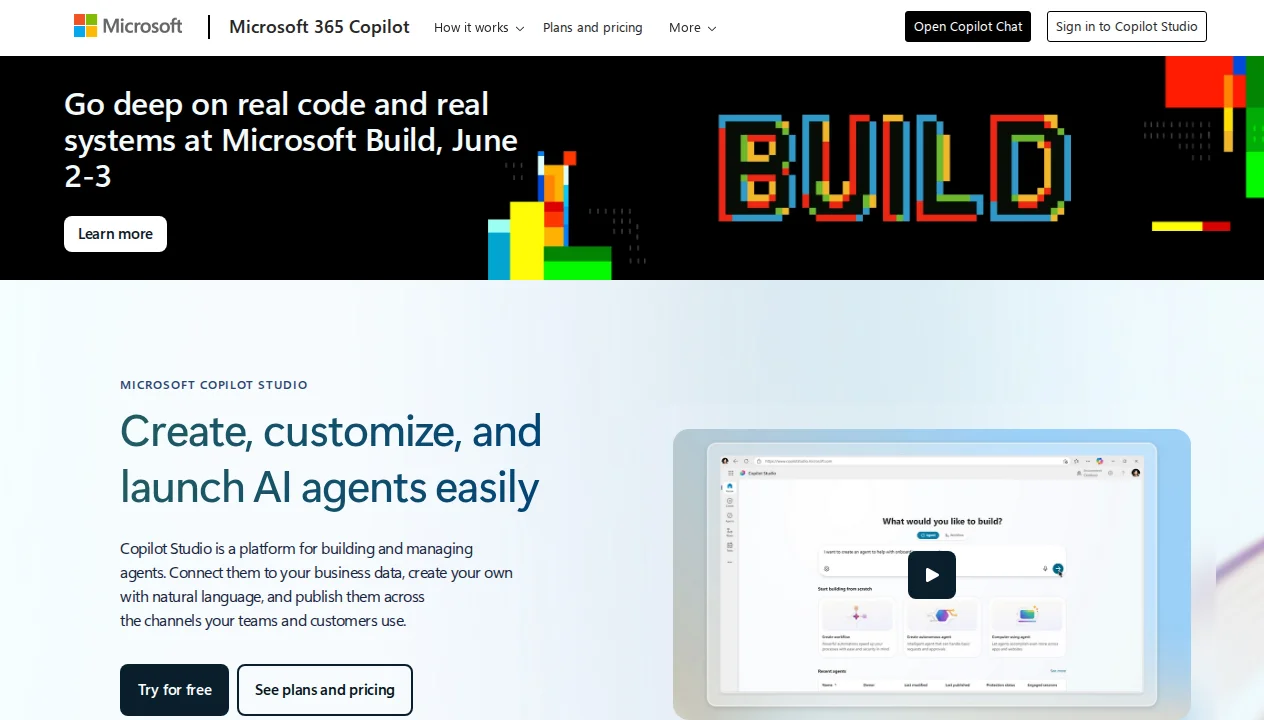
Access to Copilot Studio is available at copilotstudio.microsoft.com with a Microsoft 365 account. For M365 Copilot license holders, internal agent creation is included immediately — no additional license purchase required. The initial interface presents a canvas-based agent builder where you define the agent's name, purpose, available knowledge sources, and connected actions in plain language or via graphical configuration.
The learning curve is genuinely low for basic deployments. Microsoft has invested significantly in making Copilot Studio accessible to business analysts and power users, not just developers. You can create a functional FAQ agent from a SharePoint knowledge base in under an hour, deploy it to Teams, and begin gathering user feedback the same day. The complexity scales as you add multi-step actions, API integrations, and custom logic — but the starting point is more accessible than most enterprise platforms.
Key Features in Depth
1,400+ Connectors via Power Platform
Copilot Studio's most quantitatively impressive specification is its connector ecosystem: over 1,400 pre-built connectors to external services and APIs, inherited from Power Platform. These span enterprise software (Salesforce, SAP, ServiceNow, Workday), productivity tools (Google Workspace, Slack, Jira, Zendesk), databases (SQL Server, PostgreSQL, Oracle), and hundreds of specialized SaaS applications. The practical implication is that an agent built in Copilot Studio can access and act on data from virtually any enterprise system your organization uses.
In a deployment scenario I evaluated, a Copilot Studio agent was configured to handle employee IT help desk requests: it received issues via Teams, queried ServiceNow for existing ticket history, checked Active Directory for user permissions, created new tickets in ServiceNow, sent notifications via email, and escalated to a human queue when issues exceeded its resolution capability. This cross-system action sequence was configured primarily through the connector library without writing any custom API integration code — a compelling demonstration of the connector advantage.
Premium connectors (Salesforce, SAP, and others) require Power Automate Premium licenses in addition to Copilot Studio licensing, which adds cost complexity. But the breadth of available connectors means the integration question for most enterprise deployments is "which connector to use" rather than "can we connect at all."
Model Context Protocol (MCP) Support
Copilot Studio added support for the Model Context Protocol in early 2026, allowing agents to connect to external MCP servers for tool use and data access. MCP is an emerging open standard for AI model tool integration that simplifies connecting agents to external capabilities — think of it as a universal plugin interface for AI tools. This support positions Copilot Studio agents to leverage the growing ecosystem of MCP-compatible tools and data sources beyond Microsoft's own connector library.
For developer-oriented deployments, MCP support significantly expands what Copilot Studio agents can do without requiring full Power Platform connector development. If your team has existing internal APIs or tools with MCP interfaces, they can now be connected to Copilot Studio agents with minimal friction. This is an important signal about Microsoft's platform direction: Copilot Studio is evolving toward openness alongside its Microsoft-ecosystem integration depth.
Multi-Agent Orchestration
Copilot Studio supports multi-agent architectures — scenarios where one orchestrating agent routes requests to specialized sub-agents based on context. An enterprise deployment might have a primary HR agent that handles general questions directly but routes payroll inquiries to a specialized payroll agent with Workday integration and benefits questions to a separate agent with benefits portal access. The orchestrating agent manages the conversation context and handoffs transparently to the end user.
This architecture enables organizations to build modular agent systems where each agent has narrow, well-defined capabilities rather than trying to make one agent handle everything. The maintainability and security benefits are significant: you can update or restrict the payroll agent without touching the general HR agent, and access controls can be configured at the agent level. Microsoft positions this as the architecture for scaling from pilot deployments to enterprise-wide deployment.
M365 Copilot Integration
For organizations with M365 Copilot licenses, Copilot Studio agents are accessible directly within Microsoft 365 applications — Teams, Outlook, Word, Excel — as first-class participants. A custom Copilot Studio agent appears in Teams exactly like Microsoft's built-in Copilot assistants. This seamless UX integration removes the friction of users needing to navigate to a separate portal or remember a different interface for each AI tool they use.
Starting July 2026, Microsoft is making AI capabilities standard across M365 plans, expanding Copilot features to all M365 users rather than requiring a separate Copilot add-on license. Copilot Studio's role as the primary agent-building interface for M365 means its user base will expand significantly as AI becomes a baseline M365 feature rather than a premium add-on.
Pricing Breakdown
Copilot Studio pricing has two distinct tracks depending on whether agents serve internal (M365 users) or external (customers, partners) audiences:
| Scenario | Price | What's Included | Best For |
|---|---|---|---|
| Internal agents (M365 Copilot users) | Included | Unlimited agent creation and use for M365 Copilot license holders | Employee-facing agents, internal HR/IT/support |
| External agents — Message Pack | $200/25K credits/mo | 25,000 message credits for customer/partner-facing deployments | Customer service bots, partner portals |
| Pay-as-you-go | Variable by model/message | Billed per message via Azure subscription | Variable-volume external deployments |
| M365 Copilot (prerequisite) | $30/user/mo (enterprise) | M365 Copilot license that includes Copilot Studio for internal use | Organizations scaling M365 AI broadly |
The internal agent inclusion is a standout deal: if you're already paying for M365 Copilot licenses, Copilot Studio for internal deployments costs nothing additional. This changes the ROI calculation significantly — the only costs are development time and any premium connector licensing.
External agent pricing is less straightforward. The $200/month for 25K message credits sounds reasonable, but the definition of "message" (a credit is consumed for each turn in a conversation, including system messages) means actual user conversation capacity is lower than the credit number implies. High-volume customer service deployments can exhaust credit packs quickly. The pay-as-you-go option via Azure provides flexibility but requires Azure billing management. See Microsoft's official Copilot Studio pricing for current rates.
Copilot Studio vs The Competition
Copilot Studio vs Salesforce AgentForce: The comparison is primarily an ecosystem choice. AgentForce has the advantage for organizations with deep Salesforce CRM investment — its native data access is unmatched in that context. Copilot Studio has the advantage for M365-centric organizations. Both platforms offer enterprise governance; the difference is which data model your agents need to act on.
Copilot Studio vs Google Vertex AI Agent Builder: Vertex AI Agent Builder offers more model flexibility and technical depth for engineering teams building custom agent architectures. Copilot Studio offers substantially lower code requirements and better business-user accessibility. The Copilot Studio vs Vertex choice often comes down to whether the primary builders are business analysts or ML engineers.
Copilot Studio vs Intercom Fin: Intercom Fin is purpose-built for customer service AI and delivers faster results for that specific use case. Copilot Studio is a general-purpose agent builder that requires more configuration to reach comparable customer service performance. If your use case is specifically customer support and you're not in the Microsoft ecosystem, Fin is likely the faster path.
What We Don't Like
External agent pricing is confusing: The Message Pack and pay-as-you-go options involve credit units that don't map intuitively to "conversations" or "users." Multiple independent analysts have noted the difficulty of cost forecasting for external agent deployments. Microsoft needs clearer unit pricing that business buyers can reason about without technical expertise.
Microsoft ecosystem lock-in: The platform's value scales with Microsoft ecosystem adoption. Organizations not using M365 Copilot don't benefit from the inclusion pricing, and many premium connectors require additional Power Platform licensing. The total cost of ownership advantage materializes primarily for organizations already invested in the Microsoft stack.
Enterprise feature depth requires technical expertise: While the basic builder is accessible to business users, advanced features — custom APIs, complex action sequences, multi-agent orchestration, MCP integrations — require developer involvement. The low-code promise holds for simple agents but doesn't fully extend to complex enterprise deployments.
Governance tooling still maturing: Compared to AgentForce's Command Center, Copilot Studio's built-in agent monitoring and auditability is less mature. For regulated industries with strict AI governance requirements, additional Azure monitoring configuration may be needed.
Our Verdict
Microsoft Copilot Studio earns a 4.1/5 from us. For organizations operating within the Microsoft ecosystem — particularly those with M365 Copilot licenses — it is the most pragmatic choice for enterprise AI agent deployment available today. The inclusion of internal agent capabilities at no additional cost, combined with 1,400+ connectors and genuine low-code accessibility, represents exceptional value for the right organization.
The score reflects the real limitations: external agent pricing complexity, enterprise lock-in, and governance tooling that lags behind best-in-class for regulated industries. These are meaningful considerations, but they don't outweigh the platform's strengths for the substantial majority of Microsoft-centric enterprise deployments.
The bottom line: If your organization runs M365 and you're building AI agents for internal use, start here — the economics are compelling and the integration story is unbeatable. If you're building customer-facing agents at high volume or you're not on the Microsoft stack, evaluate Intercom Fin, AgentForce, or Vertex AI Agent Builder based on your specific ecosystem and use case.
Pros & Cons
Pros
- Deep Microsoft ecosystem integration
- No-code/low-code builder
- Enterprise security and compliance
- Powerful automation with Power Platform
- Supports both DIY and professional dev
Cons
- Expensive for small teams
- Requires Microsoft 365 subscription
- Complex licensing model
- Learning curve for Power Platform
Our Ratings
Verdict
Microsoft Copilot Studio earns a strong 4.4/5 in our testing. It is a solid choice for enterprises building custom ai assistants across microsoft products, offering a good balance of features and accessibility.
Starting at $200/month, it is priced competitively for what it offers. If you are evaluating AI enterprise, Microsoft Copilot Studio deserves serious consideration.
Frequently Asked Questions
What is Microsoft Copilot Studio and who is it for?
Is Copilot Studio free with Microsoft 365?
How does Copilot Studio compare to Power Virtual Agents?
What are message credits in Copilot Studio?
Does Copilot Studio support voice agents?
Sources & References
- Microsoft Copilot Studio Official Site· Official product page with features, connectors, and use cases
- Microsoft Copilot Studio Pricing· Official pricing for Message Packs, pay-as-you-go, and M365 Copilot inclusion
- CodaOne — Microsoft Copilot Studio Review· Independent tool review covering features, pricing, and real-world usability
- Software Advice — Microsoft Power Virtual Agents Profile· User reviews and ratings from enterprise buyers on G2/SoftwareAdvice
- Copilot Experts — Microsoft Copilot Pricing Guide· Detailed pricing guide covering M365 Copilot and Copilot Studio cost scenarios

Written by Marvin Smit
Marvin is a developer and the founder of ZeroToAIAgents. He tests AI coding agents daily across real-world projects and shares honest, hands-on reviews to help developers find the right tools.
Learn more about our testing methodology →Related AI Agents
Salesforce Agentforce
Enterprise AI agents deeply integrated with Salesforce CRM for autonomous customer service and sales.
Read Review → →Google Vertex AI Agent Builder
Google Cloud's platform for building AI agents with Gemini, optimized for enterprise search and chat.
Read Review → →